
Watch the video overview, get the guide
To get started, watch an overview to see how Manage AI can:
- Extract court dates from documents and have them added to your calendar.
- Generate accurate bills in seconds.
- Anticipate the need for a client update and draft it for you.
- And more!
The guide provides best practices for getting started with Manage AI to take manual work off of your plate.
-



Extract dates from documents and add them to your calendar
Manage AI eliminates the manual review of adding dates buried in documents and instead identifies and creates the calendar events for you. For verification, you get a side-by-side view of where the date was found in your document so full context is always available.
-


Anticipating and drafting client updates
Manage AI anticipates the need for a client update based on recent matter activity, and will have a draft ready to go. All you have to do is review and send, so you never miss the right moment to keep your client up to date.
-
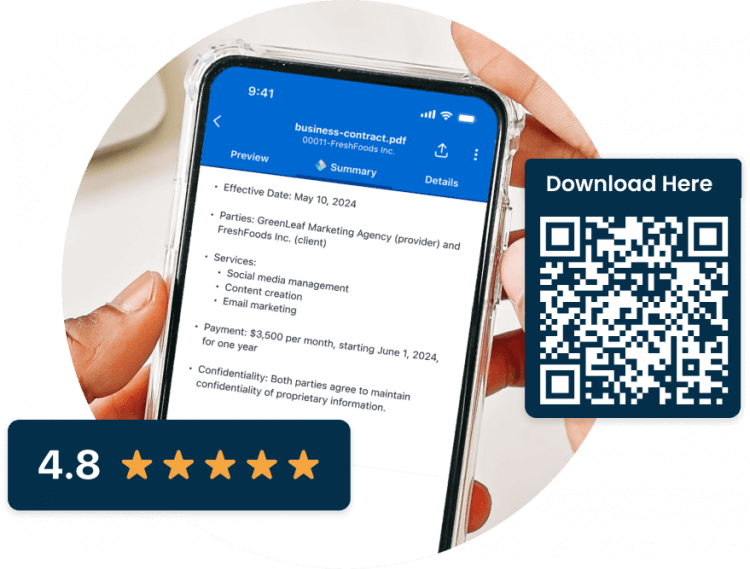
Legal AI in Clio’s mobile app for law firms and lawyers
Get your law firm and legal AI in your pocket.
Use AI to summarize complex documents, and respond to clients from anywhere with AI-generated responses. Clio’s mobile app keeps you up to date on your cases and captures your billable time while your on the go.


-
 Mature man in a blue blazer sits at a conference table, looking to his right. An overlay menu shows Automated Billing and options: Start automating bill generation, Bill generation schedule, Billing approvers, Billing rules, and Bill details.
Automate your billing schedule
With Manage AI billing week is no longer stressful! By setting when bills are generated, what details are included, and the thresholds for bill creation, all of your bills are generated for you when you need them to be.
This means all you have to do is review and finalize billing entries. Manage AI also makes sure bills get to the final approvers so they get completed quickly.
-


Keep your firm moving with recommendations and insights
With Manage AI’s proactive recommendations, you get to prioritize your workload and have potential risks flagged before they become issues. This helps you stay focused on what matters most.
For further insights, use Manage AI’s document analyzer to surface the key details you need to keep your matter moving without spending time searching or digging.
Check out how they work with these guided tours!
-

Bookmark the Manage AI help center
Need technical information or other info about Manage AI? Check out the Clio Help Center. Here you can also learn more about other Manage AI functionality like matter recommendations or performance metrics.
Visit the Clio Help Center
Manage AI FAQs
How do I get started with Manage AI and what training resources are available?
As a first step to using Manage AI, watch this introductory video and utilize the information in this welcome kit. For further information, visit the Help Center to get technical setup information.
How do I access Manage AI?
To access Manage AI, first log in to Clio Manage where you will see Manage AI in multiple different workflows. At any time, you can launch Manage AI from the gem icon next to the global search bar. Additionally you can find Manage AI in the personal or matter dashboard or on tabs like calendar, billing, and documents.
How is Manage AI different from other AI tools?
Manage AI is specifically-tailored for legal professionals. Unlike generic AI tools Manage AI offers:
- Legal-specific functionality that address unique legal needs, such as scanning court documents and extract dates, automating legal billing, drafting legal specific client communication, case summaries, legal document analysis, and recommendations on the right legal work to do.
- Manage AI is a part of Clio Manage, and that allows users to access AI capabilities directly alongside their existing case and client data. This ensures a cohesive experience without needing to switch between platforms.
- Data security and privacy. Manage AI prioritizes the protection of sensitive legal information. It operates within the strict security protocols of Clio, which ensures that your data is secure and not used to train external AI models.
- User-friendly interface. Manage AI offers an intuitive, user-friendly interface designed for legal professionals, which makes it easy to adopt and use without extensive training.
- Comprehensive support. Manage AI benefits from Clio’s dedicated customer support and continuous updates, ensuring users have access to the latest advancements and assistance.
What should I do if I experience issues or need technical support?
If you experience issues or need technical support when using Manage AI, our support team is available 24/5. To reach Clio support, call 1-888-858-2546 ext. 2; email [email protected]; or chat with support in-app.
How does Manage AI ensure data privacy?
Manage AI maintains the same high-level security standards as the rest of Clio’s products. Data is never used to train AI models or for any other external purposes. Manage AI operates within your existing user permissions to ensure that only information you are authorized to view is accessed and displayed.
What ethical considerations should legal professionals keep in mind when using AI software?
When using AI software for lawyers, you should consider several important ethical implications:
- Data privacy. Ensure that sensitive client information is securely protected. Manage AI adheres to strict data privacy standards, but it’s essential for lawyers to remain vigilant about how data is handled.
- Accuracy. Verify that the outputs generated by Manage AI, such as calendar events, bills or document and matter summaries are accurate and reliable. Always cross-check AI-generated information with your own legal expertise.
- Bias awareness. Be mindful of potential biases in AI outputs. While Manage AI is designed to minimize bias, it’s important to review AI recommendations critically to ensure fairness and objectivity.
- Professional judgment. Use Manage AI to enhance your practice, not as a replacement for professional judgment. AI can support and streamline tasks but should complement, not substitute, your legal expertise and decision-making.
By adhering to these ethical considerations, you can effectively and responsibly integrate Manage AI into your legal practice.
Essential legal AI resources for law firms


Do more with Clio
If your firm does not have Manage AI turned on, book a demo below to see how it works.