
-



Get started with Clio File
Lay the foundation for confident court filing
A smooth filing experience starts with a few simple yet powerful best practices:
Make sure your firm details are accurate. Your firm name, address, and email for service are included in each filing and are shared with the court. Take a moment to confirm they’re correct to ensure a smooth filing experience and prevent delays.
Understand what’s already set up for you. Clio File creates a certified eFiling Service Provider (EFSP) account for you so there’s no need to register directly with the court or Tyler Technologies. You’re ready to file immediately after signing up.
Check jurisdictional support. Clio File supports e-filing in a growing number of states and counties. Use the state coverage page to confirm that the courts you file in are supported and keep checking back as we expand.
File-ready formatting matters. Most courts require documents to be filed as PDFs. Plus, many have strict limits on file size. Convert Word documents to PDFs before filing and compress large files to meet court requirements.
Start with a low risk filing. If this is your first time e-filing, consider submitting a document for a matter that’s not time-sensitive. This gives you a feel for the workflow and confidence for higher-stakes filings.
-


File and serve documents and court forms
Submit with confidence—every time
Once you’re set up, you’re ready to file with precision. This stage is all about filing efficiently and minimizing the chance of rejection.
Know what counts as a lead document. Courts often require separate lead documents for petitions, responses, and motions. Clio File supports multiple lead documents in one filing when needed.
Double-check your service selections. Proper service is essential. Confirm whether electronic service, mail, or personal service is required by your court.
Review your attachments and metadata. Clear document naming, correct filing codes, and attachments in the right order prevent rejections and delays.
Submit early when possible. Filing ahead of deadlines gives you buffer time in case the court requests revisions or resubmissions.
-
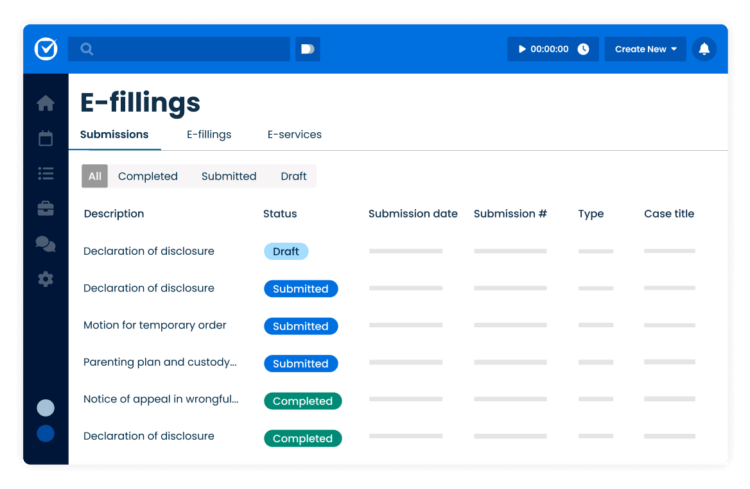

Track and manage e-filings
Keep filings organized and moving forward
Once your documents are filed, your focus shifts to monitoring statuses, catching any issues, and keeping your clients informed. Clio File gives you the tools to stay on top of it all without having to switch systems or chase down court portals.
Use the e-filing dashboard as your mission control. The Clio File dashboard gives you a real-time view of every filing across every matter so you can instantly check whether something’s been accepted, returned, or is still processing. Sort and filter by status, person who filed, or matter to stay organized and act quickly when needed.
Respond to court-returned filings fast. If a filing is returned for correction, Clio File flags it clearly in your dashboard. You’ll receive an email notification too, so you’re never caught off guard. Quickly revise and resubmit directly from the dashboard to avoid missing critical deadlines.
Keep clients informed with less effort. The visibility you have in Clio File makes it easy to loop clients in. Whether you’re sharing a status update, re-filing after a return, or following up with the court, everything you need is right there.
-


Manage filing expenses and payments
Track costs effortlessly and recover them with ease
Filing fees are automatically charged to the credit card on file for your Clio subscription—no separate setup required. And because every filing starts from a matter, those costs are instantly tied to the right case, making it simple to create billable expenses and recover costs from clients.
Billable expenses, created for you. By default, Clio File automatically creates an expense entry for each filing. Most users keep this setting on to save time and ensure costs can be easily passed along to clients. No extra steps, no missed disbursements—just accurate records and faster reimbursement.
Recover costs without the admin overhead. With filing fees automatically logged and linked, you can stay focused on your casework while still capturing the full value of every filing.
-


Never miss a deadline
Stay court-compliant with automated deadline tracking
Whether you’re managing one case or dozens, missing a filing deadline can mean real consequences. Clio’s court rules functionality helps you stay on top of court-mandated deadlines without the manual calendar math.
Jurisdiction-specific rules allow you to apply a rules-based deadline set to any matter in Clio. Deadlines automatically populate based on court procedure, filing type, and trigger events like service or filing dates.
Everything in one place. Dates appear directly in your Clio calendar, alongside your tasks and reminders, so your team never misses a key filing, hearing, or service window.
Built-in compliance. Stay aligned with local court rules as they change. Clio keeps your rule sets up to date, so you don’t have to chase them down or guess what applies.
Clio File Frequently Asked Questions
Do I need a separate account with the court to file with Clio File?
Nope! When you sign up for Clio File, we’ll automatically create the necessary court e-filing account for you. No separate registration or login required.
How do I know if my filing was submitted successfully?
You’ll receive real-time updates in Clio File, and you can track the status of every filing from the e-filing dashboard or within the associated matter. We’ll also send you a confirmation email once your filing is accepted.
Can I recover filing fees from my clients?
Absolutely. Filing fees are automatically tied to your matter and, by default, Clio File creates a billable expense entry for each one. You can include this on your next invoice without the need to track it manually.
What file types are accepted for e-filing?
Most courts require PDF format. If you’re working in Word, you’ll need to convert your documents before filing. Need help compressing large PDFs? Follow this guide.
Essential e-filing resources for Clio File users



Get started with Clio File—your way
From first-time users to seasoned filers, Clio File is built to support you at every stage. Start filing today or connect with a product expert.
Have questions? To reach Clio support, call 1-888-858-2546 ext. 2;
email ([email protected]) or chat with us in-app.