Have trust in your trust account management
Properly manage the request, deposit, transfer, and disbursement, and refund of trust funds at every step. Know that client funds are always properly logged across your ledgers.
-
Generate requests and accept deposits with ease
Speed up how you request and deposit funds into trust, all in accordance with Canadian legal industry rules. You can send trust requests by email or accept trust deposits through click-to-pay links, QR codes, or our secure client portal.
-
Create client-friendly invoices that comply with Canadian regulations
Clearly present line items on your legal invoices that detail the movement of funds held in trust along with remaining trust balances.
-
Stay on top of your trust account balances
Use evergreen trust management to stay on top of retainers in Clio’s trust account management software, and set an alert when available funds drop below a certain threshold.
-
Comfortably move funds in and out of trust
Create automated logs for all trust transactions as you apply funds to invoices, transfer funds to operating accounts, and issue disbursements or refunds.
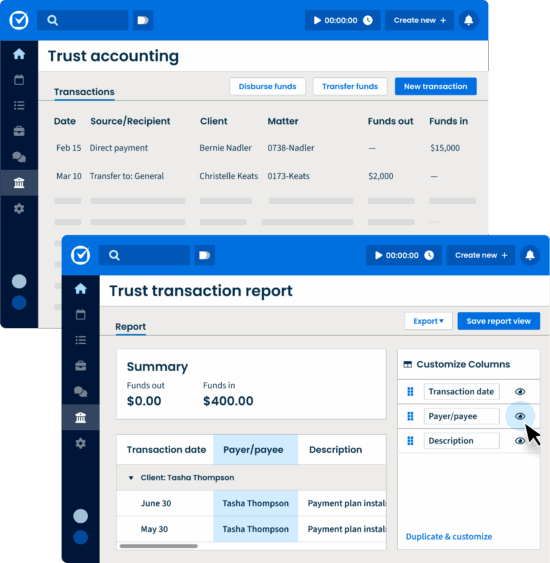
Keep trust accounts in line with Canadian rules
-
Set up separate ledgers for trust and operating accounts
Use Clio’s trust account management software to track trust and operating accounts as required by Canadian legal industry regulators. See all transactions connected to a matter or client, and whether they impact your trust or operating accounts.
-
Keep it simple and reconcile directly in Clio
With several reconciliation options, choose to manage your firm’s trust accounts from the same place you already bill and collect payments—right in Clio. Simply match trust transactions to your bank account statement directly from the Accounts tab.
-
Stay trust accounting compliant with reports
Run built-in legal trust account reports required for trust accounting compliance. Clio keeps detailed records of your client’s operating and trust funds. You can view all accounts and transactions associated with a client, generate statements of account, and access up to ten years of reconciliation reports.
Trust account management software FAQs
How do I keep my trust accounts full of funds?
Our trust account management software offers an evergreen management feature that sends you a notification when trust accounts reach a minimum dollar amount.
You can also create a credit card payment plan that will automatically charge a client on a monthly or weekly basis, and deposit the specified amount into their trust account.
Does Clio have the specific report required for trust accounting compliance in my jurisdiction?
Clio’s trust account management software allows you to either reconcile directly in Clio or make use of built-in reports that help meet general trust accounting guidelines, in addition to several reports made for specific jurisdictions. Our trust account management software also allows you to export transactions to Excel. See how.
Can I use QuickBooks Online or Xero without integrating to Clio?
Using an accounting solution built for the nuances of the Canadian legal industry is important to maintain compliance. Clio offers trust account management software for lawyers through several different options depending on your accounting preferences, all with the goal of helping you reconcile and maintain compliance with ease.
What information syncs with QuickBooks Online?
Clio’s trust account management software syncs your contacts, bills, time entries, expenses, Clio’s payment processing software transactions, and trust transactions to QuickBooks Online automatically. Additionally, you can sync hard costs thanks to a built-in hard cost importer. Find it and 100+ other integrations in our app directory.
What information syncs with Xero?
Clio’s best-in-class integration with Xero syncs your Clio contacts, time and expense activities, bills, credit notes, interest, and Clio’s payments processing software transactions for accounting purposes. Find it and 100+ other integrations in our app directory.
More Clio Manage features
-
Calendaring
Meet every deadline with legal-specific features like automatic court date scheduling.
-
Case Management
Stay organized and access the information you need—from anywhere, at any time.
-
Artificial Intelligence
Work smarter with AI: Turn routine work into completed actions—built right into Clio.
-
Client Management
Easily organize contact details, documents, and communication logs from intake to invoice.
-
Law Firm Reporting
Unlock deeper insights with custom reports in Clio Manage. Filter, group, preview, and schedule reports that align with how your law firm works—faster.
-
Task Management
Manage firm productivity by assigning and tracking task completion.
-
Billing
Create custom bill plans based on fee structure and reduce manual data entry. Bill via email or our secure client portal. Leverage legal AI to generate bills automatically and route them to the right approvers.
-
Online Payments
Make it easy to pay and get paid with online payments.
-
Time & Expense Tracking
Seamlessly track time and expenses to make billing simple and accurate.
-
Law Firm Communications
Manage client and firm communication all on one platform.
-
Legal Document Management
Edit, store, and organize your legal documents securely, from anywhere.
-
Client Portal
Enable clients to securely communicate and collaborate with their lawyer from desktop or mobile.

Book a Live Demo
Book a live demo to see how Clio can help your law firm maximize efficiency and increase revenue
Try Clio for Free
Try Clio’s legal software free for 7 days with no obligation. Easy setup. No credit card required. Cancel anytime