-
Access your legal documents from anywhere
Securely store your video, image, text, and audio documents in one place with unlimited document storage. Plus, access them anytime, anywhere from your phone or laptop.
See how it works -
Prepare legal documents quickly
Spend less time preparing stacks of documents, and more time preparing your case. Use conditional fields to autofill documents with case and client information stored in Clio.
-
Never misplace a document again
Find the file you’re looking for in seconds. Use terms in the title, text, or metadata to search for a file, or sort them by category, folder, author, and date.
-
Simplify every court and client interaction
Remove the hassle of downloading, printing, and scanning documents. Automatically generate documents as cases progress, ensuring essential paperwork is prepared at the right stage of a case. File court documents, serve legal papers, collect e-signatures, and more—directly from your case.
See it in action -
Accelerate document reviews with AI
Transform your documents into actionable insights. Instantly summarize case files and extract key details, along with their sources, so you can focus on strategic decision-making.
Do more with Manage AI
Intuitive file management from your desktop
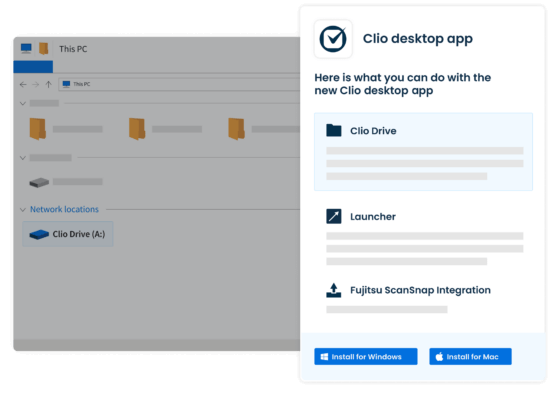
Thousands of Canadian legal professionals use Clio’s collection of desktop solutions to quickly and easily manage their files. Available on Windows and Mac.
-
Work seamlessly between your desktop and the cloud with Clio Drive
Create, access, and share your matter-related files right from your desktop, and securely sync them to Clio using our virtual drive experience. No need to download or reupload.
Learn more -
Open files from the web for easy document editing
Use Clio to easily open files from your web app into programs like Microsoft Word, Adobe Reader, and more. Any updates you make will be saved on your desktop and in the cloud.
See it in action
Collaborate on legal documents with ease
Manage documents as a team. Stay in sync as you create, annotate, and collaborate on files.

-
Sync documents across all your tools
View, edit, and save your documents directly from Clio Manage to Dropbox, OneDrive, NetDocuments, and Google Drive.
-
Share documents easily
Quickly share legal documents with clients and co-counsel via Clio for Clients, a secure online client portal. Set permissions to authorize specific access within your firm.
-
Track changes and conversations
Stay on top of document changes with a full version history and running comment thread for each file stored in our document management system.
See it in action
Explore more features
-
Calendaring
Meet every deadline with legal-specific features like automatic court date scheduling.
-
Case Management
Stay organized and access the information you need—from anywhere, at any time.
-
Artificial Intelligence
Work smarter with AI: Turn routine work into completed actions—built right into Clio.
-
Client Management
Easily organize contact details, documents, and communication logs from intake to invoice.
-
Law Firm Reporting
Unlock deeper insights with custom reports in Clio Manage. Filter, group, preview, and schedule reports that align with how your law firm works—faster.
-
Task Management
Manage firm productivity by assigning and tracking task completion.
-
Billing
Create custom bill plans based on fee structure and reduce manual data entry. Bill via email or our secure client portal. Leverage legal AI to generate bills automatically and route them to the right approvers.
-
Online Payments
Make it easy to pay and get paid with online payments.
-
Time & Expense Tracking
Seamlessly track time and expenses to make billing simple and accurate.
-
Law Firm Communications
Manage client and firm communication all on one platform.
-
Client Portal
Enable clients to securely communicate and collaborate with their lawyer from desktop or mobile.

Book a live demo
Book a live demo to see how Clio can help your law firm maximize efficiency and increase revenue
Try Clio for free
Try Clio’s legal software free for 7 days with no obligation. Easy setup. No credit card required. Cancel anytime
Legal document management software FAQs
What is legal document management software?
Legal document management software allows lawyers and legal professionals to store, organize, and easily access documents. It is designed to help increase productivity at law firms by making documents easier to find, edit, access, and share.
It also helps safeguard sensitive information by preventing unauthorized access, while also reducing a firm’s reliance on paper, printing, and physical storage.
Want to see how easy Clio makes document management? Try Clio for free.
What features should law firm document management software have?
Before selecting a legal document management solution for your law firm, ensure it has the following features:
Unlimited document storage: You should be able to store everything you need for every case in a secure location.
Security: Your legal document management system should store and back up all of your files securely.
Permissions controls: You should be able to control who can view and edit documents in your system.
Advanced search: Your system should be able to search text within documents of various file types (e.g. MS Word DOCs and PDFs) so you can quickly find what you need.
Version control: Easy tracking of the last updated version of a document as well as previous versions.
Electronic signatures: You should be able to have clients easily sign legal documents electronically.
Integrations: Your document management tool should integrate with other document creation and storage programs such as Box, Dropbox, OneDrive, or Google Drive.
What is the best legal document management software?
Clio is widely considered the best software for legal documents, with thousands of positive ratings on G2 Crowd, SoftwareAdvice.com, Capterra, and Lawyerist.
Clio is also trusted by thousands of Canadian legal professionals.
Where does Clio’s legal document management solution store my files?
Clio’s document management platform stores your files securely in the cloud.
Instead of hosting files on your own servers, the cloud lets you access information from anywhere with an internet connection.
How many legal documents can be stored for a matter or client?
An unlimited amount. Clio offers a document management solution for the cloud, as well as for your desktop computer. Documents you work on in the cloud will be mirrored to your computer desktop as well.
Can I set permissions and restrict access to specific documents?
You can use Clio’s user permissions to restrict access to specific users at the matter level. Only those who have permission to a matter will be able to access the documents within that matter. See how.
What are the system requirements for cloud-based law office document management software?
The only system requirement for Clio’s cloud-based legal document management solution is your internet browser (with an internet connection).
Can I migrate my documents into Clio?
Yes. You can add documents into Clio from another system. Learn how to do it in five steps.
We also integrate with popular document systems such as OneDrive, Box, Dropbox, Google Drive, and NetDocuments—making the migration process that much easier.
What’s the difference between Clio and other dedicated legal document management solutions?
Clio is more than just a legal document management system. In addition to document management, Clio provides all legal case management functionalities in one solution, including client intake, time tracking, billing and payments, and more. When you work within one tool, you can see all of your law firm’s documents next to the notes, events, time entries, and financial details for an individual case, and you can reduce lost billable hours, context switching, and human error.
What makes Clio the best document management system for law firms?
Clio is widely regarded as the best document management system for law firms due to its comprehensive and user-centric features specifically designed for the legal industry. Key benefits include:
- Secure and compliant storage: Clio ensures your documents are stored with the highest security standards, including encryption and compliance with legal industry regulations.
- Centralized document access: Effortlessly share documents within your firm and with clients, enhancing collaboration and communication.
- Automated tasks: Save time and reduce errors with automated document creation and management, allowing you to focus more on your clients and less on administrative tasks.
- Integrations with popular tools: Clio integrates with a wide array of legal and productivity tools, providing a cohesive and efficient workflow.
- User-friendly interface: Clio’s intuitive interface makes it easy for legal professionals to organize, access, and manage documents from any device.
These features collectively ensure that your law firm can operate more efficiently, securely, and effectively, making Clio the top choice document management solution for Canadian lawyers.