

Clio is the most widely used and highly rated legal practice management system
Clio is trusted by 400,000+ legal professionals worldwide. Part of what sets Clio apart is its intentional design—built to meet the unique needs of legal professionals in every region, including robust support for Canadian firms.

Software you can count on
Clio’s powerful infrastructure delivers the stability and reliability your firm needs in the high-stakes world of law. With a financially backed 99.9% uptime guarantee, you can count on consistent access to your case and client data. Clio keeps your firm running smoothly while continuously rolling out new, innovative features—without ever compromising performance.

Get flexibility and transparency with Clio
Manage your firm your way with month-to-month subscriptions, allowing you to add or reduce users as needed. Enjoy transparent pricing with no hidden fees or long-term contracts, and try Clio risk-free with a no-obligation trial.
For eight years, Clio has been ranked #1 in Legal Practice Management and Market Presence by G2.

-


Clio combines legal practice management and payment processing in one platform
With Clio, you won’t need to switch between systems to manage billing and payments. Our built-in payment solution lets you accept payments by credit card and debit card, all with clear transaction fees and no surprises. For Canadian firms, this means handling payments and billing in one place while staying compliant with local regulations.
-

Clio keeps you connected across all your devices and accounts
Clio’s cloud-based platform lets you manage your firm from anywhere. You can access your billing, documents, and communications in one place, ensuring everything is up to date Whether you’re using a Mac or PC, or Gmail or Outlook, Clio provides a consistent experience across all your tools.
-

Clio connects all your tools in one place
Whether you’re using Outlook, Zoom, or specialized tools for your practice, Clio brings everything together. With the largest range of integrations available, you can streamline your workflow by syncing data across all your firm’s technology.
-
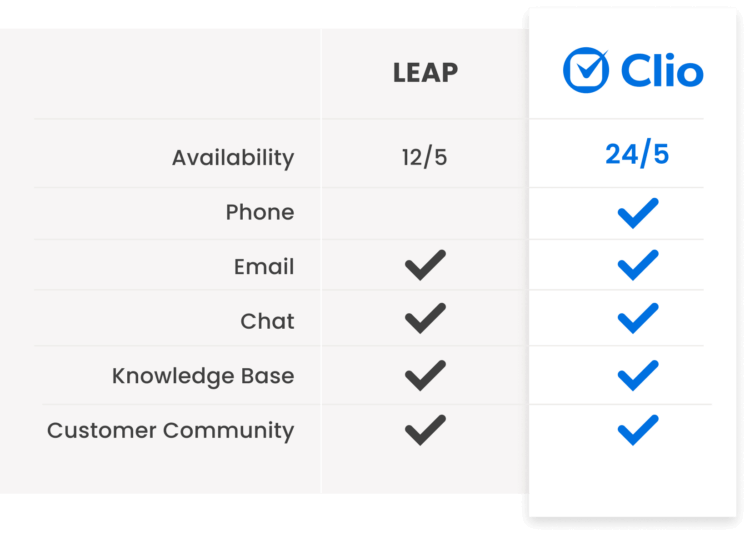
Clio’s support team is available 24/5
Get the help you need, when you need it. Our award-winning Canada-based support team is available by phone, email, and live chat. With our online help centre, you can find answers quickly or connect with our exclusive user community to see how other legal professionals are using Clio.
-

I love that Clio is essentially a one-stop shop for all my practice management needs: time tracking, billing, calendaring, etc. I also love its integrations with other apps like Outlook. Clio is quite user-friendly.

TIFFANY
Attorney -
Clio is generally easy to use and intuitive; but if you don’t know how to do something there are so many different help articles and videos to show you how. If you can’t find it in the articles or videos; their support team are rockstars.
SHAY
Administrative Coordinator -
We have a saying in our firm that if it didn’t happen in Clio it didn’t happen. Clio practice management houses our entire client file including accounting!
SARAH
Operations Manager
-
Ready to get started with Clio?
We understand migrating data from one system to another can be overwhelming. That’s why our dedicated onboarding team is ready to assist your firm’s transition to Clio.

Migration
consultation
Data export
& processing
Data import
& review -

“I was really nervous about the data migration but it was pretty much seamless. It was such a relief to hear that all the client files and data had been quickly migrated so that I could start working on the cases.”
Kristen Schneck
Owner, Abdullah and Schneck Immigration Law Group LLC
Choose how you start with Clio
Sources
- https://www.capterra.com/p/147413/LEAP/reviews/
- https://www.leap.us/faq/why-switch/
- https://status.leaplegalsoftware.com/history
- https://leap.us/integrations/feewise
- https://www.getfeewise.com/
- https://community.leap.us/s/article/Assigning-emails-to-a-Matter
- https://community.leap.us/s/article/Entering-Your-Credentials-to-Use-LEAP-Integrated-Packages-US#@sms-&-fax
- https://community.leap.us/s/article/Sending-emails-that-will-be-received-as-an-SMS
- https://community.leap.us/s/article/Mac-Computer-System-Requirements-US
- https://community.leap.us/s/article/LEAP-Help-US
- https://www.leap.us/integrations/
