

The Release Report: August 2026
August updates include Vincent in Clio Operate, live docket research in every thread, prompt-built Studio workflows, and more. See what's new in Vincent.
Most legal AI systems live outside the matter, forcing lawyers to leave the work to find answers. August closes that: Vincent now works in Clio Operate itself, researches live US court records alongside case law with Docket Insights, and drafts Studio workflows from plain language.
Each release builds Vincent deeper into the work itself. Here’s what’s new.
Vincent in Clio Operate: AI that works inside the matter
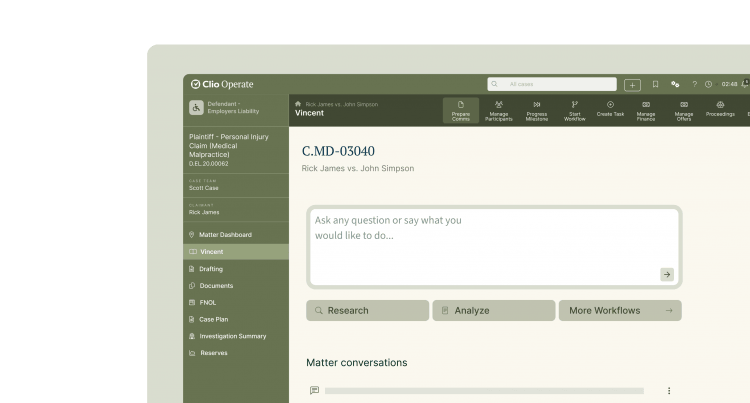
On August 25, Clio announced Vincent in Clio Operate, bringing Vincent directly inside the platform where large firms and organizations manage their most complex legal work. Together, the release brings the matter, the AI that acts on it, and the verified law behind it into one place.
Vincent now reasons over live Clio Operate matters: the documents, phases, tasks, workflows, and history. It draws on the matter’s own workflows and chronology as they exist inside Clio Operate rather than on files uploaded to a separate chat. Every Vincent interaction inherits the matter’s permissions and audit trail, and outputs save straight back to matter fields, chronology, and Wiki pages.
It’s the foundation of a platform where legal AI moves with the matter rather than sitting beside it, grounded in a legal library of more than a billion primary sources that Clio owns outright.
Read the full Vincent in Clio Operate announcement.
Docket Insights: Live court records in every research thread
Published opinions are a court’s final word, but they’re only a fraction of what happened to get there. The motions filed, the arguments made, the hearings held, and the procedural back-and-forth all shape how and why a ruling came out the way it did.
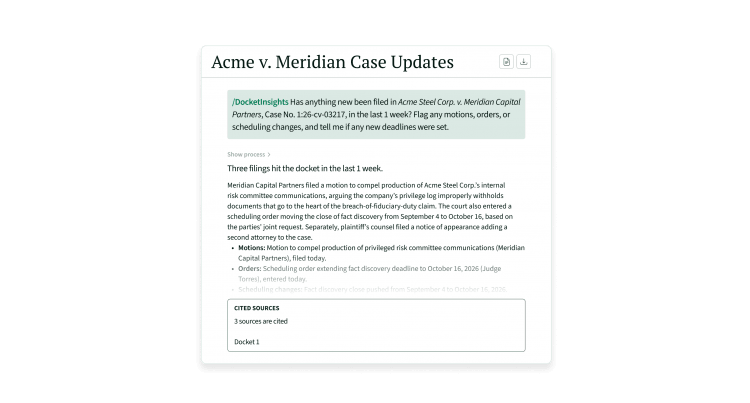
Docket Insights surfaces all that context inside Vincent, turning research from reactive to contextual. Vincent now researches roughly 1 billion US federal, state, bankruptcy, and administrative court records alongside case law, in the same conversation, automatically when a question calls for it or directly through /docket insights. This feature brings:
- Full docket workflow in one thread: Search court records, pull and summarize docket sheets, and read filings, then keep going with follow-up questions instead of restarting the search each time.
- Judge and opposing counsel profiling: See directional patterns on how a judge tends to rule or how opposing counsel has litigated, built from available filings.
- Source documents through Docket Alarm: Firms with a Docket Alarm subscription can click straight through a citation to the underlying filing. Without one, you can still view up to three dockets a week before being prompted to set up access.
Docket Insights turns context into case strategy, reading opposing counsel’s tendencies and benchmarking how similar disputes have played out. Lawyers move from researching an issue to examining filings to drafting a response, all without leaving the thread.
Studio Natural language workflow builder: Describe a workflow, get a starter draft
Describe a workflow in plain language and Studio drafts the steps, inputs, and actions for you, landing in an editable draft for review.
Type a request like “summarize new client intakes and email the assigned attorney” and Studio pre-populates a starter workflow in draft state.
Get to a faster draft to refine instead of a blank canvas to build from.

See it in the Studio Tutorial Library.
Studio Model selector: Choose which model runs your workflows
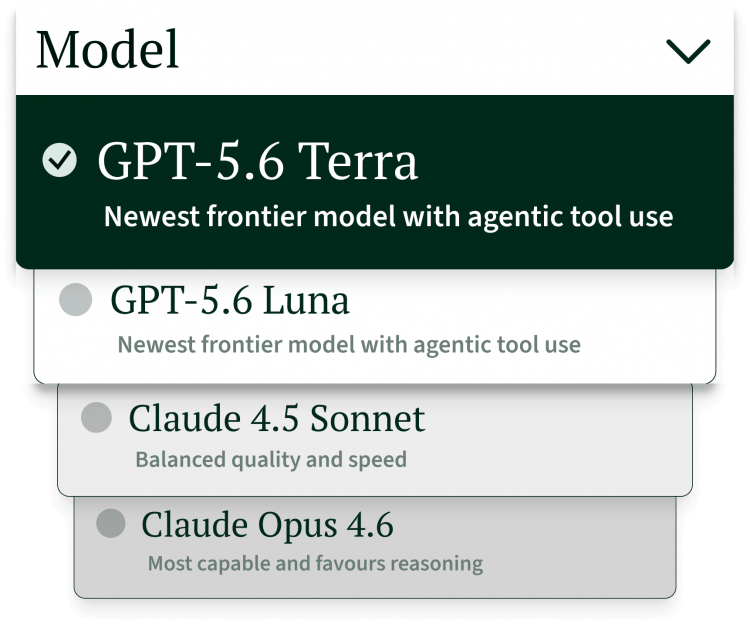
Studio workflows already run on Clio’s chosen model by default. Model selector extends that: firm admins can test a workflow across Claude, GPT, and Gemini before choosing which one becomes the default execution engine for that workflow.
Run the same workflow against more than one model in test mode and compare outputs side by side. Once you select a preferred model, it runs that workflow for the whole organization.
See it in the Studio Tutorial Library.
Legal research in Studio: Sourced answers, built into the workflow
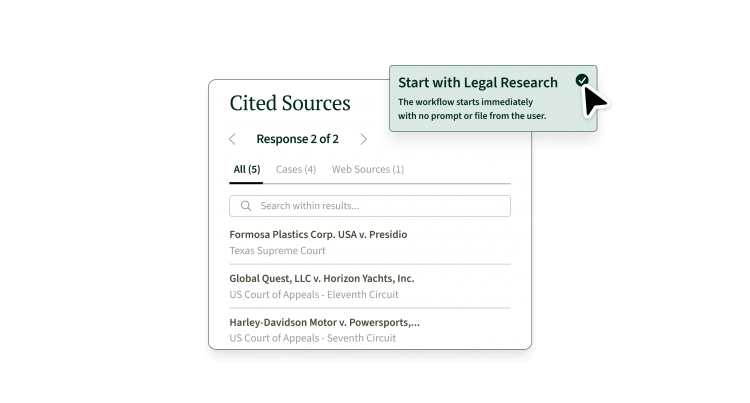
Any workflow can now call Vincent’s own research directly, as a starting point or mid-process. The research becomes context that carries into every step that follows, so a partner’s research process, the specific jurisdictions, the format, the sequence, gets applied consistently across every matter and every associate who runs the workflow, not just the one who built it.
Add a “Run legal research” step at the start of a workflow or drop it in mid-process. The next step receives a citation-backed summary as context to work from.
It’s built for research you need done a specific way: a specific format, specific jurisdictions, or a process you need to rerun the same way every time.
Conversation status: Track every thread’s status at a glance
History view already showed every past conversation. Conversation status extends that with a live indicator for where each thread stands, so you can monitor several tasks at once without opening each one.
- In progress: Vincent is still working the thread.
- Completed: Shown as unread or read, so you know whether you’ve seen the result yet.
- Action required: The thread needs your input before it can continue.
- Error encountered: Something needs your attention before the thread can proceed.

Six releases this month, all pointed toward one direction: less switching, more work done where the matter already lives.
That’s the August release. See you next month.
Transform your law firm with AI for legal work
Schedule your personalized demo of Vincent to see firsthand how AI engineered for lawyers can transform your legal workflows.