Features of Clio’s legal case management system
Experience the power of the industry’s leading law firm case management software. With a centralized dashboard, you have a complete overview of all case information and link every contact, document, calendar event, note, time entry, and bill to the appropriate case to make your law practice management tasks flow as smoothly as possible.

-
Reduce redundant tasks
Streamline your legal practice with Clio cloud practice management, case management software to manage documents, bill, track time, and more: Get it all done faster, and with less risk of error, and so you can focus on the tasks that are the most important to your legal practice.
Learn more about task management -
Access every case detail from anywhere
Your documents, bills, client contact info, and more, can be accessed from any computer with an internet connection when you use Clio’s case management software for lawyers. You can also download Clio's law firm mobile app for lawyering on the go.
Learn more about law firm app -
Add case information from existing software
Log emails, file legal documents, and sync case details to Clio from over 300 other apps and software, including Outlook, Google Workspace, and Dropbox. Benefit from full integration for increased flexibility and smoother processing of legal cases.
Learn more about Clio integrations
What lawyers say about our case management software
Trusted by 400,000+ legal professionals, and approved by 100+ bar associations and law societies worldwide, including all 50 US state bars, Clio's legal case management tool is the clear choice amongst lawyers.
Collaborate on cases with lawyers and staff
Clio's law firm case management software makes it easier to manage cases and gives every member of your law firm insight into what's happening. This makes collaborating on difficult cases and streamlining the day-to-day running of your practice a breeze.

-
Improve client and colleague communications
Use Clio's case management platform as your firm’s single source of truth. Set permissions to protect sensitive case details and communicate with clients and co-counsel with Clio’s secure online portals, Clio for Clients and Clio for Co-Counsel.
Learn more about Clio for Clients -
Track case progress at a glance
Set the status of a case to Open, Pending, or Closed. Use notes and secure messages to easily share updates on a case. And allow collaborations between colleagues for more efficient processing of cases.
See Clio in action -
See real-time case developments
Collaborate efficiently to do the best work for your clients. Track every change made to a legal case, including new time entries and documents. See who made what change and when.
See it in action
Configure Clio’s legal matter management software to meet your law firm’s needs
Enhance the way you work, save time on menial tasks, and focus on those that count for your legal practice.
-
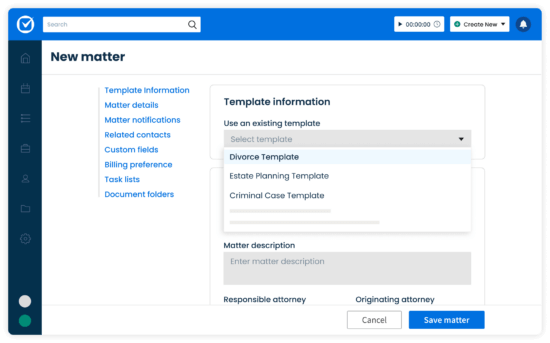
Accelerate matter creation
Get more time back in your day with easy-to-use legal templates filled with preset information. Plus, improve consistency and accuracy of information across all your cases.
See how it works -
Standardize tracking of key case details
Create custom data fields specific to your law firm’s processes or legal practice areas to collect, store, and search for case details efficiently. Use this information for document automation.
-
Organize cases the way you want
Attach custom categories, task lists, billing rates, payment profiles, budgets, and more to each of your legal cases.
See Clio in action -
Use online intake forms to populate case profiles
Create custom online intake forms with Clio Grow and sync them to Clio Manage to streamline the client intake process.
Learn more about online intake forms
-


Legal case management software with AI built in
AI legal case management takes the routine work off your matters. Manage AI automates everyday tasks like generating bills, extracting key details from documents, planning your day, and creating events or adding time entries and expenses—all you have to do is ask.
Learn more about Manage AI
More Clio Manage features
-
Document Management
Edit, store, and organize your legal documents securely, from anywhere.
-
Artificial Intelligence
Work smarter with AI: Turn routine work into completed actions—built right into Clio.
-
Billing
Create custom bill plans based on fee structure and reduce manual data entry. Bill via email or our secure client portal. Leverage legal AI to generate bills automatically and route them to the right approvers.
-
Client Management
Easily organize contact details, documents, and communication logs from intake to invoice.
-
Calendaring
Meet every deadline, with legal-specific features like automatic court date scheduling.
-
Task Management
Manage firm productivity by assigning and tracking task completion.
-
Online Payments
Make it easy to pay and get paid with online payments.
-
Time & Expense Tracking
Seamlessly track time and expenses to make billing simple and accurate.
-
Law Firm Reporting
Unlock deeper insights with Custom Reports in Clio Manage. Filter, group, preview, and schedule reports that align with how your law firm works—faster.
-
Client Portal
Enable clients to securely communicate and collaborate with their lawyer from desktop or mobile.
-
Law Firm Communications
Manage client and firm communication all on one platform.
-
Personal Injury
Close cases faster by organizing medical liens, damages, and settlements alongside your case files.
-
Trust Account Management
Simplify legal trust account management with Clio and stay compliant with state bar regulations.
Clio Work
Legal AI so you can practice at your best.
Clio Work understands your cases, their context, and the law. Analyze documents, build strategy, and produce work grounded in verified legal authority.
- Analyze documents and case files in minutes
- Surface relevant precedent and legal authority automatically
- Draft memos, motions, and client communications
- Connect to Clio Manage for richer, matter-aware context


Book a live demo
Book a live demo to see how Clio can help your law firm maximize efficiency and increase revenue.
Try Clio for free
Try Clio’s legal software free for 7 days with no obligation. Easy setup. No credit card required. Cancel anytime.
Legal practice management software FAQs
What is legal case management software?
Legal practice and case management software is a digital tool that law firms use to manage their legal cases and clients and keep cases organized. It allows for a more streamlined workflow and smoother billing, time tracking, and document management processes, so you can focus on billable work.
Watch how real law firms use ClioWhat does law case management software do?
Legal case management software provides you with an overview of your law firm’s cases and their affiliated details, including deadlines, documents, notes, bills, and more.
Legal case management solutions cover accounting, scheduling, time tracking, and more. All these are features that will help you manage your practice more efficiently, contribute to better cash flow management, and ease collaboration on cases. This will give you more time to work on tasks that will bring money into your legal practice.
See how Clio’s case management worksWhat is AI legal case management software?
AI legal case management software maintains the matter instead of just storing it. Standard case management gives you fields to fill in. AI case management software reads the documents you upload, extracts the dates and drafts calendar events from them, and surfaces which matters need attention next, including unlogged billable time you would otherwise write off. You still make the decisions. The AI removes the data entry between them.
What software do lawyers use?
Lawyers typically use several different types of software to run their firms. Your chosen legal software suite is the central and most important piece of the tech stack, but lawyers also use accounting software, such as QuickBooks Online or Xero, document software such as Microsoft Word, and an email provider such as Microsoft Outlook or Gmail.
Law firms may also add other tools to fulfill needs more closely related to their practice area. The Clio App Directory has over 300+ integrations to explore, so you can find out how it will integrate with the tools you are currently using.
Watch how lawyers use Clio in practiceWhy should my law firm use case management software?
From automation to document creation, legal case management software keeps you organized on matters and cases, so you can manage more clients in less time and streamline your business at every step.
Case management solutions like Clio help lawyers spend more time focusing on practicing law and serving clients, and less time doing administrative and non-billable tasks. See how.
What is the best legal case management software?
The best legal case management software includes features that help law firms operate efficiently—such as case management, billing, calendaring, accounting, task management, online payments, time and expense tracking, and document management.
To choose the right solution, look for verified reviews, client testimonials, and industry recognition. Clio is widely regarded as the leading case management software, trusted by 400,000+ legal professionals and approved by 100+ bar associations and law societies worldwide.
Clio also maintains a rating of 4.5/5 or higher on trusted platforms like G2 Crowd, SoftwareAdvice.com, Capterra, and Lawyerist.
See Clio in action to learn more.
What kind of customer support is included?
Clio offers unlimited support 24 hours a day, 5 days a week, so we can answer any questions you might have without impairing your working day.
How do I transfer my current cases into my new software?
Clio’s data migration team can assist in bringing over information from another legal case management solution to our software so that you don’t have to do it manually.
Schedule a free demoHow much does case management software cost?
The cost varies greatly, depending on whether you’re using an on-premise or cloud-based solution. Cloud solutions tend to be more cost-effective for most firms, with their low monthly pricing models, free support, and free updates.
Our legal case management software offers different pricing plans starting at $39 a month. We want to ensure firms of all sizes and requirements can find a solution that meets their needs.
What features should a good case management software for lawyers include?
A good case management software for attorneys should offer a comprehensive suite of tools that enhance client service, boost productivity, and streamline day-to-day law firm operations. Key features to look for include:
Case management: The ability to manage clients and cases and keep all case information organized. This enables you to quickly refer to notes about the case and prepare for court in the most efficient way possible.
Client/contact management: Case management also takes place on a per-client or per-contact basis, so managing your face to meetings and calls with the client is crucial.
Task management: The ability to create and assign tasks to different staff and lawyers. Sophisticated solutions like Clio’s legal case software can automate parts of this process when a case is created. Clio’s software suite even allows you to automate the billing process so you can reduce any potential cash flow problems you might encounter.
Calendar: Your case management tool needs a full calendar with capabilities to manage your busy schedule, as well as sharing your calendar with colleagues. That way you can avoid possible dreaded meeting room clashes.
Timekeeping: The ability to enter time as you work or after the fact. Case management solution with timers helps you capture more billable time while you work. This means you will be able to streamline your billing process and keep on top of all the cases your practice handles.
Email: Your legal case software should integrate with your chosen email provider. This makes it easier for lawyers to file emails to cases and follow-up on any developments. Another email feature you might be interested in is whether your chosen software can create a database of email addresses for each case the lawyers at your practice are currently working on.
Document management: Can you use it to organize and store documents, and collaborate on them? Does it integrate with Google workspace or your Microsoft Office package? These are questions that need answering so you can fully integrate your chosen software solution into your workflow.
Document automation: Many case management tools allow you to use templates to automatically create new documents, saving lawyers valuable time.
Accounting: Your legal case software may not have a full accounting solution, but you should be able to reconcile accounts and view balances and transactions. You can also use the software to set up invoice reminders and automate the collections process. Therefore, this reduces the time you spend chasing up invoices, asking lawyers to send out invoices or getting invoices validated.
Trust accounting: The ability to track transactions related to operating accounts and trust accounts separately. The software should also allow you to send notifications through to trustees when their account has reached the minimum amount and needs topping up.
Invoicing and billing: Your practice management software should help you seamlessly generate bills and send them to clients. This saves you considerable time and money and allowing you to focus on the more important tasks like answering client questions and reassuring clients.
Online credit card payments: More and more clients want to pay their lawyers via credit card or online. Your practice management software should offer the option to process payments via credit card, making it more convenient for your clients.
Secure client portal: For sharing sensitive files and communications, an encrypted client portal with your case management platform is the best option for ensuring client information is kept confidential. This portal should also allow you to schedule client appointments and phone calls so that you can make sure they are well looked after, therefore, contributing to building up a solid business relationship with your clients.
Integrations: Your practice management software is the central hub for your law firm, but it needs to connect with the tools you already use and tools you might want to use in the future. You need to make sure it connects to your email client, your accounting software, and any other tools you need. Integrating all those tools will allow for a smoother workflow and increased productivity.
Reports: How is your firm doing financially? How are you tracking against your goals? Your practice management software should be able to give you key business insights to answer these questions. It should provide you with options to automate these reports or to email them through to you on a scheduled date.
See Clio in actionHow do you choose a law office case management software?
To choose the right law office case management software, start by identifying gaps in your current workflows—such as inefficiencies in case tracking, client communication, or document handling. Look for a platform that integrates with your existing legal tech stack, allowing seamless sharing of case and contact information to minimize duplicate data entry and reduce errors.
Attorney case management software like Clio offers a comprehensive solution that can help streamline daily operations, improve collaboration, and ensure your firm has the tools it needs to work efficiently.
See Clio in actionIs Clio suitable for small law firms looking for simple case management software?
Absolutely! Clio’s user-friendly design and scalability make it perfect for small law firms. With an easy setup process and customizable features, Clio enables small firms to tailor the software to their unique needs effortlessly.
Its intuitive interface ensures that even legal practices with limited technical resources can manage their cases efficiently and effectively, without the complexity often associated with other law firm software.
Clio works as AI legal case management software for small law firms too: the AI extracts deadlines from filed documents, drafts the client update, and flags the matters that need attention this week, which is the work a firm without a dedicated paralegal otherwise absorbs.
See Clio in actionWhat makes Clio the best case management software for law firms?
Clio is the best case management software for law firms, offering a comprehensive platform with centralized case management, advanced document management, accurate time and expense tracking, streamlined billing and invoicing, and secure client communication.
Clio’s cloud-based platform ensures secure, on-demand access to your data, while its seamless integrations with over 300+ applications and robust security measures enhance overall efficiency and productivity.
Clio’s exceptional customer support and industry-leading security further solidify its position as the top choice for legal professionals.
See Clio in action