


Start drafting faster with AI
Our legal document automation AI turns your Microsoft Word documents into reusable templates that you can easily customize and autofill with case information.
Scale your legal document creation process
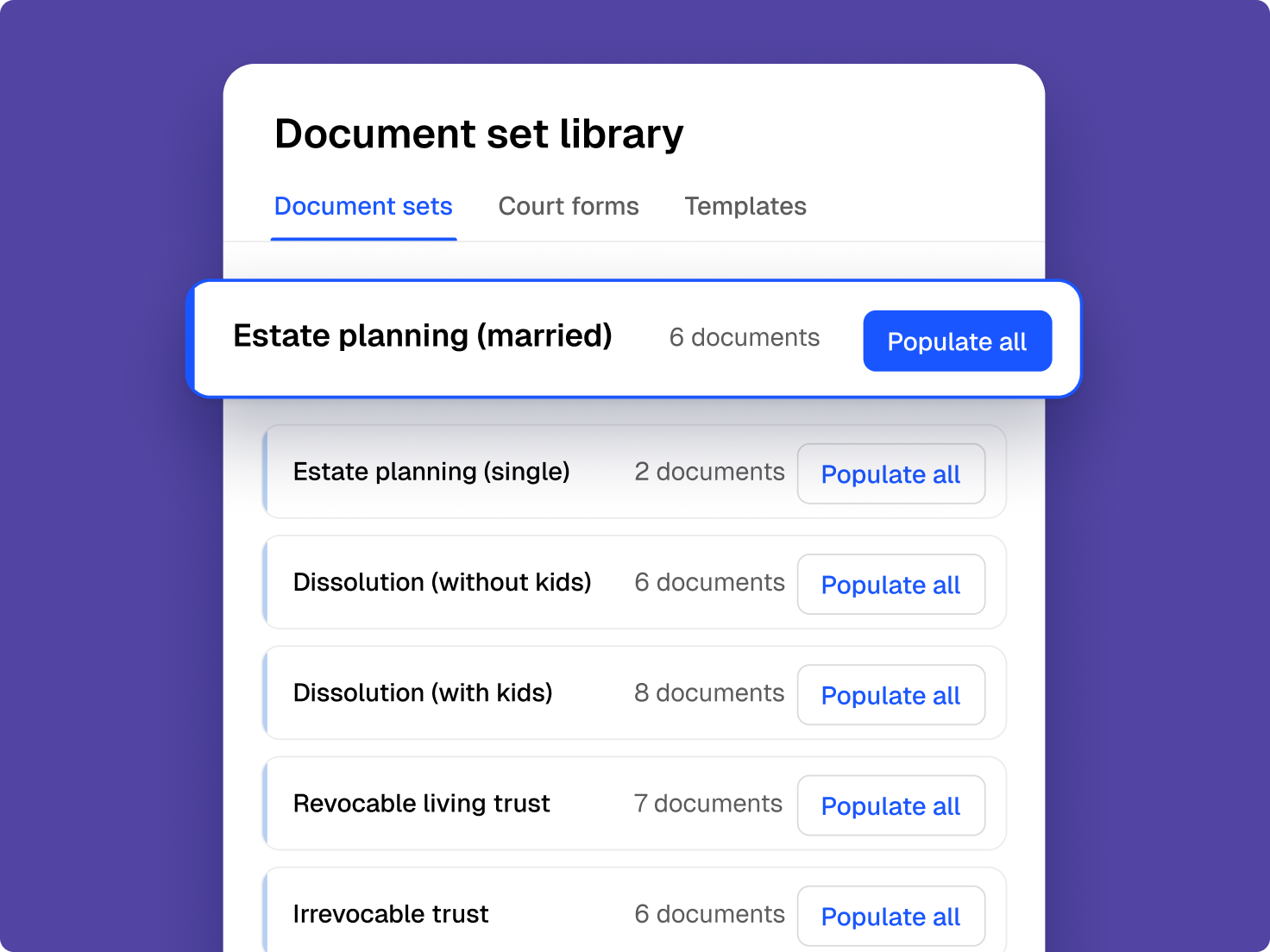
Populate multiple documents for the same case all at once. Spend more time on high-value work by automating repetitive tasks.
Fewer mistakes, more peace of mind
Less manual data entry means fewer errors—automatic pronoun and clause agreement ensures accuracy, so you don’t need to sweat the details.
Clio helps me reduce the time it takes to fill in and complete documents for my clients, while at the same time reducing the opportunity for error.
O’Neil & Rueppel, LLP
Draft in one workspace
Simplify how you create and customize legal documents
AI turns your existing files into easy-to-use templates saving you time and reducing mistakes.
-
Never start a document from scratch
Clio Work knows your full matter details so it can instantly draft documents for you.
-
Ditch your tedious document tasks
Spend more time on high-value work thanks to automation.
-
Populate whole sets of documents at once, with fewer mistakes
Work on your whole case at once, and reduce errors with less manual data entry.
Draft however you want, all in one place
Generative drafting creates a bespoke document in seconds, and document automation delivers that same speed for the work you repeat again and again.
Take control of your time
Cut the time it takes to draft legal documents by up to 80% so you can focus on the work that matters.
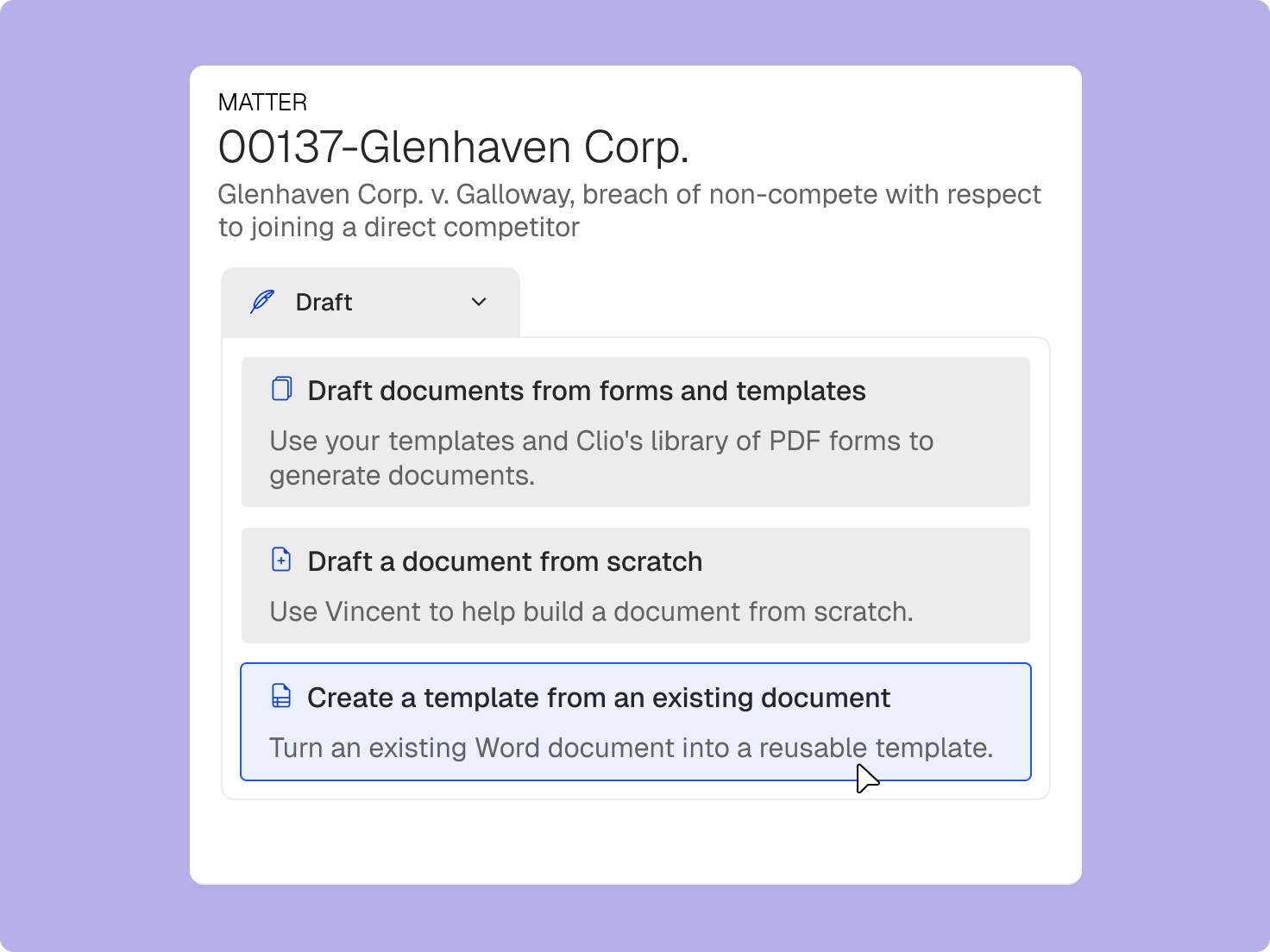
Word documents become templates
Clio Work converts your existing Microsoft Word files into fillable templates so you can draft documents faster and with fewer mistakes.
Get it right the first time
Automate your drafting processes to reduce manual error and ensure your firm is always using the latest document versions.
Clio is a must-have for the modern law firm. We save a ton of time, reduce the opportunity for errors, and turn around client work faster. It’s a godsend.
Levine Family Law Group
Legal document automation software FAQs
What is legal document automation software?
Legal document automation software turns standard legal documents into reusable templates that fill in client and matter details automatically, so you don't build each document from scratch. Law firms use it for fee agreements, contracts, discovery requests, leases, and more. With conditional logic, the template adjusts pronouns, verbs, and clauses to fit each matter, and some tools also let you send a questionnaire to collect what the document needs from the client. Request a demo.
How does Clio Work use AI for legal document drafting?
Clio Work uses AI to streamline every step of legal document creation. It automatically pulls client and matter details from Clio Manage, suggests the right clauses, formats documents for consistency, and reduces errors. With AI built in, Clio Work helps lawyers produce accurate, professional documents in a fraction of the time. Request a demo.
How does Clio Work’s law firm document automation solution work?
Clio Work’s advanced law firm document automation software allows you to convert existing Word documents into fillable online templates. The document automation solution for lawyers uses advanced features to update pronouns, verbs, and clauses automatically based on parameters such as client details or specific case information. It simplifies the document drafting process by allowing you to create reusable rules and conditions that ensure accuracy and consistency across all documents. Request a demo.
What are the features of law firm document automation software?
Key features of law firm document automation software include:
- Customizable templates: Turn your existing documents into reusable legal templates that can be tailored for each case.
- Data integration: Ability to pull data from various sources to populate documents automatically.
- Conditional logic: Incorporation of logic-based conditions to adjust document content based on specific criteria that allows law firms to do things like adjusting pronouns and verbs to agree with client-specific details, and adding or removing clauses based on case information.
- Collaboration tools: Features that allow multiple users to work on documents simultaneously.
- Version control: Tracking changes and maintaining document history to ensure accuracy. Cloud-based technology, such as Clio Work, ensures that your firm always uses the latest version of any document. This eliminates the need for maintaining multiple versions and reduces the risk of errors or omissions due to outdated information. All team members can access and work on the most current version, ensuring consistency and accuracy.
What are the benefits of automating legal documents?
Automating legal documents offers several benefits:
- Time savings: Automation reduces the time spent on repetitive drafting tasks. Clio Work enables the conversion of existing Word documents into online legal templates that can be automatically populated with client and case information, allowing legal professionals to complete documents more quickly and focus on more strategic work.
- Increased accuracy: Minimizes human errors by standardizing document creation. Clio Work reduces errors by auto-populating case information instead of relying on manual entry. This minimizes the risk of typos and inaccuracies in client names, addresses, and other critical details.
- Cost efficiency: Lowers operational costs by streamlining workflows.
- Improved client service: Enables faster turnaround times and enhances client satisfaction.
- Consistency: Ensures uniformity across all documents, maintaining a professional standard.
How do you implement document automation software for law firms?
Implementing document automation software for your law firm involves several steps:
1. Assess needs: Identify the types of documents and processes that would benefit from automation.
2. Select software: Choose a platform that aligns with your firm’s requirements and integrates with existing systems.
3. Customize templates: Turn your existing Microsoft Word files into reusable templates tailored to your specific legal services.
4. Train staff: Provide training to ensure effective use of the software.
5. Monitor and optimize: Regularly review the system’s performance and make necessary adjustments.
What’s the best legal document automation software?
Clio Work stands out as the best document automation software for law firms due to its comprehensive features and user-centric design:
- Advanced document automation: Clio Work enables users to convert Microsoft Word documents into reusable templates, streamlining the creation of legal documents.
- Conditional logic: The platform incorporates conditional logic, allowing for dynamic adjustments within documents based on specific criteria, ensuring accuracy and relevance.
- Integration with Clio Manage: Seamless integration with Clio Manage lets you automate the population of templates with client and matter information, reducing manual data entry and potential errors.
- Access to court forms: Users have access to an extensive library of up-to-date court forms across all 50 U.S. states, ensuring compliance and efficiency in legal proceedings.
- Legal document template service: Benefit from Clio Work’s certified legal experts who can create custom document templates for your firm, allowing you to focus on client work and billable matters.
- Remote access and team collaboration: As a cloud-based platform, Clio Work enables you to manage work from anywhere, making sure your team remains productive regardless of their location. This eliminates the need for multiple document versions by providing access to the latest version for all team members, facilitating seamless collaboration.
These comprehensive features position Clio Work as a leading choice for legal professionals seeking to optimize their document automation processes.
What is conditional logic in document automation?
Conditional logic refers to the use of “if-then” statements within document templates to dynamically adjust content based on specific criteria or inputs. This allows for the creation of documents that can change in response to different variables, ensuring that the final output is tailored to the particular circumstances of each case. For example, Clio Work’s conditional logic functionality allows law firms to adjust pronouns and verbs to agree with client-specific details or to add and remove clauses based on case information. Request a demo
What are the benefits of using logic-based conditions in document automation for law firms?
Incorporating logic-based conditions in document automation for lawyers offers several advantages:
- Customization: Enables the generation of documents that are specifically tailored to individual client needs.
- Efficiency: Reduces the time required to modify documents for different scenarios.
- Accuracy: Ensures that all relevant clauses and provisions are included or excluded as necessary, minimizing the risk of errors.
- Consistency: Maintains uniformity across documents while allowing for necessary variations based on specific conditions.
Logic-based conditions in Clio Work allow you to customize documents dynamically. You can create rules that adjust pronouns, add or remove clauses, and update subject-verb agreements based on specific parameters or answers from multiple-choice fields. This feature enhances the flexibility and accuracy of your documents, ensuring they are tailored to each unique case. Request a demo
What types of documents can I upload and convert into automated templates?
With Clio Work you can convert commonly used Microsoft Word documents such as fee agreements, discovery requests and responses, contracts, and more into smart legal templates. Request a demo
How does Clio Work improve grammar and consistency in legal documents?
Clio Work can automatically adjust pronouns, verb tenses, and subject-verb agreement based on your case inputs. This ensures grammatical accuracy and eliminates the need to maintain multiple versions of the same document. Request a demo
What’s the benefit of using my own documents instead of third-party templates?
Clio Work lets you transform your firm’s existing, customized documents into smart templates. This eliminates the need for generic third-party forms and ensures that your documents reflect your firm’s unique voice and legal strategy. Request a demo
How does Clio Work streamline the legal document workflow?
Clio Work simplifies the entire legal drafting process by combining data intake, document generation, and e-signature in one place. This removes the friction of manual editing and helps your team create accurate, court-ready documents faster. Request a demo