

About This Template
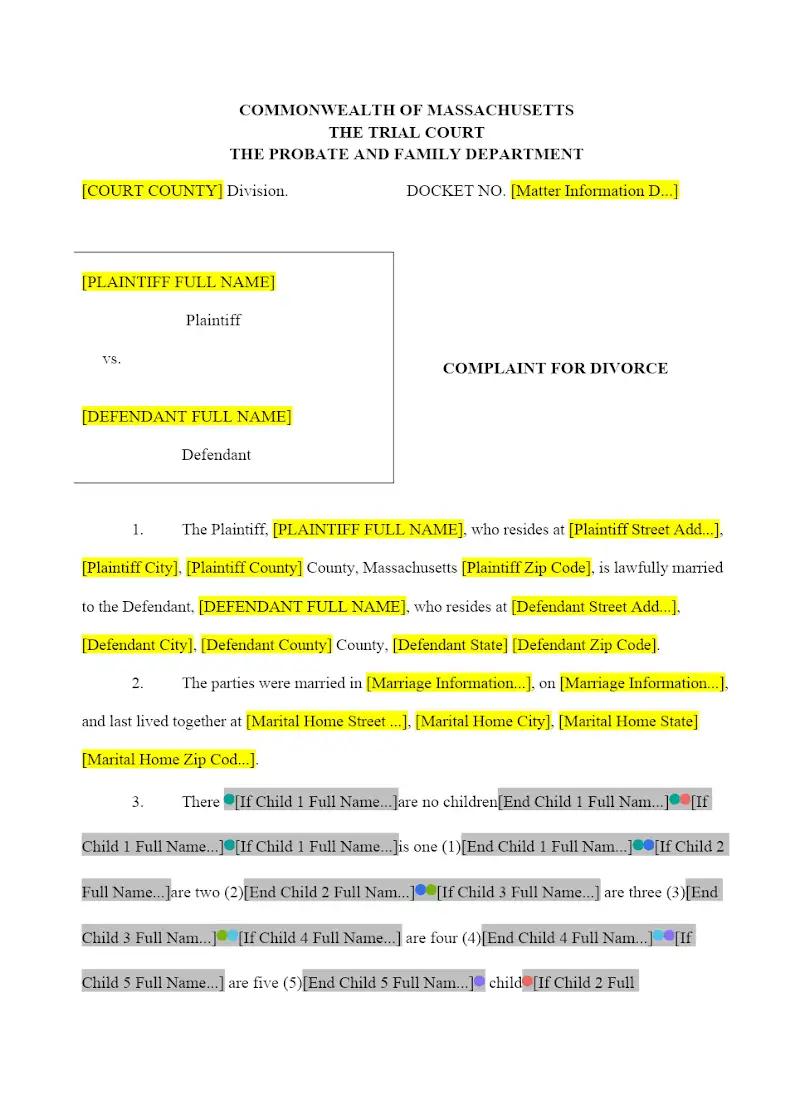
The first step in a Massachusetts divorce requires a procedurally perfect filing to begin the statutory process. This template provides a pre-formatted Complaint for Divorce tailored for filing in a Massachusetts Probate and Family Court. This efficiency tool ensures that law firms quickly and accurately plead the necessary jurisdictional facts and grounds, especially those pertaining to the no-fault grounds common in the Commonwealth, accelerating case initiation and maintaining procedural compliance.
Jurisdiction Notes
This complaint is specific to Massachusetts General Laws (M.G.L. c. 208) and the Massachusetts Rules of Domestic Relations Procedure. Attorneys must ensure the correct residency and jurisdictional facts are alleged. Massachusetts has both no-fault (e.g., M.G.L. c. 208, $S$ 1A or 1B) and fault grounds, and the complaint must clearly specify which section applies. Pay particular attention to the unique requirements for "no-fault" (1A or 1B) filings, as the subsequent procedure and court documents will var
What is this template?
This is the initial pleading filed with the Massachusetts Probate and Family Court to initiate the dissolution of a marriage. The Complaint for Divorce template includes the mandatory jurisdictional allegations, the specific statutory grounds for divorce (e.g., irretrievable breakdown or specific fault grounds), and the necessary requests to the court regarding the division of marital property, alimony, and, where applicable, a custody and parenting schedule for any minor children.
How to Customize
With Clio Draft
If this template is available in your region, you can activate it in your Clio Draft account. It will then be pre-filled with information from your contacts and matters, helping you save time.
- Click Request Template, and complete the Request Information form.
- Open the activation email to activate the template in Clio Draft.
- In Clio Draft, go to Library and select the Court forms subtab.
- Select a category to view all the court forms associated with that category.
- Find the form that you need. You can use the search bar to search by form number or form title.
- Click the Actions dropdown and then select Create form template.
- At this stage, you can configure any fields on the template that will remain consistent across multiple matters and specific practice areas.
- Purple fields: These fields are highlighted in purple because they are connected to linked fields that will automatically insert information entered on the Populate page. If you fill in a purple field, the data in that field will always populate when you draft a document from this form template and will not be overwritten by text entered on the populate page.
- Blue fields: These fields are highlighted in blue because they are unique to a specific matter. You will enter this information after you generate the form template, on the Populate page.
For detailed instructions for drafting form templates and more information about Clio Draft, see Clio Draft: Form Templates and Clio Draft: Draft and Manage Documents.
This form couldn't be loaded. Ad blockers and strict privacy settings can prevent it — disable your blocker for this site, then reload.