
Work on documents,
not around them
Understands the full document
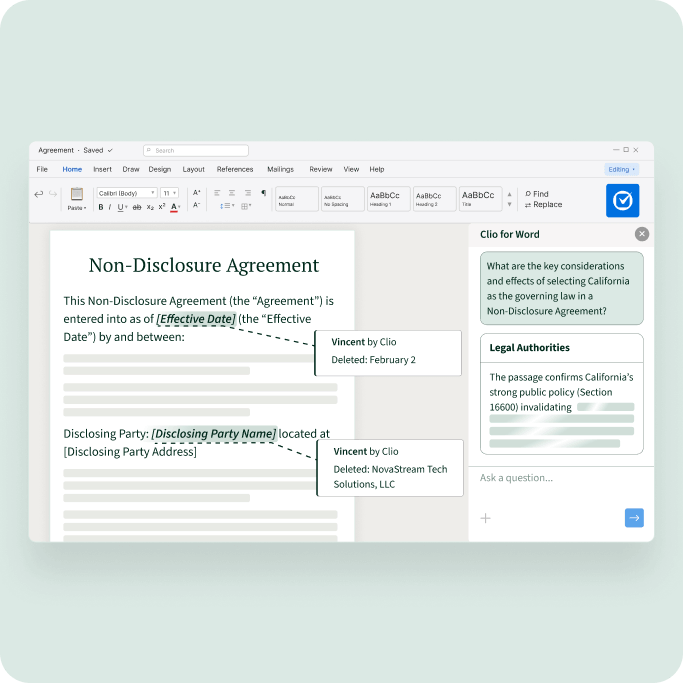
Vincent reads your document as it exists in Word, including every clause, redline, and comment. No uploads, no copy and paste, no lost context.
Edits you can trust
Every suggestion appears as a native Track Change. Review, accept, or reject using the same workflow you already use, just faster and more consistent.
Works from any starting point
Start with a blank page or marked up draft. Flag risks, rewrite clauses, and surface key issues directly from the sidebar without leaving Word.
Do legal work in Word with Vincent
Available now in beta for Vincent customers.
Microsoft Word
Add-In FAQ
How does Vincent work inside Microsoft Word?
Vincent works through a sidebar in Microsoft Word. It reads your full document, including existing redlines and comments, and responds to prompts in real time. Suggested edits appear as standard Track Changes that you can accept or reject.
Who can access Clio for Word?
Clio for Word is currently in beta for large law firms and in-house legal teams. Book a demo to learn more about access and availability.
Does Vincent replace how I review and edit documents in Word?
No. Vincent works in Microsoft Word and presents edits as native Track Changes. You review and control every change before it is applied.