

  • Platform + Products
  • Who We Serve
  • Enterprise
  • Resources
  • Pricing

Platform

  • Legal AI

    AI grounded in your matters and the law, built into the workflows you use daily

  • Trust & Security

    Enterprise-grade security and compliance, backed by a dedicated in-house team

  • Integrations

    Connect Clio to 300+ apps your firm already relies on

Explore Platform

Products

  • Clio Work

    Take on complex legal work, from research & analysis to strategy & drafting

  • Clio Manage

    Centralize matters, clients, & finances to run a productive firm

  • Clio Grow

    Attract new clients, simplify intake, & build lasting relationships

  • Clio Operate Enterprise

    Manage complex matters, coordinate teams, & standardize workflows for large law firms

  • Vincent Enterprise

    Strengthen legal analysis, strategy, & drafting for large law firms & legal teams

Explore all capabilities

Who We Serve

Software for solos to Large Law and in-house teams, across every area of law.

  • Solo Firms
  • Small Firms
  • Mid-sized Firms
  • Large Law
  • In-House
  • Government
Explore Who We Serve

Areas of Law Practice

  • Administrative
  • Bankruptcy
  • Business & Compliance
  • Civil Litigation
  • Criminal
  • Elder
  • Employment
  • Estate Planning
Explore Practices
  • Family
  • General Practice
  • Government
  • Immigration
  • In-House Counsel
  • Intellectual Property
  • Personal Injury
  • Real Estate

Featured

Legal Trends Report book by Clio.

Legal Trends Report : The industry’s leading study, with data to benchmark your firm on AI and profits.

Learn more

Enterprise

Legal AI and operations built for large law firms and in-house legal teams.

  • Large Law

    Strengthen margins, embed firm expertise, and deliver client value at scale.

  • In-House

    Standardize operations, control outside counsel spend, and move faster.

Explore Enterprise

Platform

  • Trust & Security

    Enterprise controls like SSO, audit trails, and ethical walls protect your data.

  • Vincent in Operate

    Vincent is legal AI built into Clio Operate, reasoning from your firm’s matters and the law behind them.

Products

  • Clio Operate

    Move high-volume matters across teams with workflows, approvals, and governance large firms need.

  • Vincent

    Use enterprise legal AI to verify citations and deliver court-ready answers from 1B+ curated legal sources.

Resources

  • News & Press
  • Legal Trends Report
  • Blog
  • Customer Stories
  • Guides
  • Events
  • On-Demand Webinars
  • Help & Support
Explore Resources

Trending Topics & Tools

  • AI for Law Firms

    A practical guide to using AI

  • Law Firm Marketing Popular

    Attract and convert more clients

  • Starting a law firm Popular

    A step-by-step guide

  • Law Firm Billing

    Best practices for all things billing

  • Hourly Rate Benchmark Calculator

    Compare rates to lawyers in your area

  • Court forms

    Find legal forms by state

  • Legal Document Templates

    900+ free legal templates

Training & Events

  • ClioCon Registration Open

    The biggest event in legal

  • Clio Academy

    Free, on-demand courses

  • Live Training

    Live expert-led sessions

  • Clio Connects Roadshow

    1:1 time with Clio experts

  • Continuing Legal Education

    Earn free CLE credits

  • Legal AI Accelerator

    Free, practical legal AI skills

  • MS Word Certification for Paralegals

    Free, self-paced training

Featured

alt text

Legal Trends Report : The industry’s leading study, with data to benchmark your firm on AI and profits

Learn more
Sign in Try Clio for Free
  • Pricing
Platform + Products

Platform

  • Legal AI

    AI grounded in your matters and the law, built into the workflows you use daily

  • Trust & Security

    Enterprise-grade security and compliance, backed by a dedicated in-house team

  • Integrations

    Connect Clio to 300+ apps your firm already relies on

Explore Platform

Products

  • Clio Work

    Take on complex legal work, from research & analysis to strategy & drafting

  • Clio Manage

    Centralize matters, clients, & finances to run a productive firm

  • Clio Grow

    Attract new clients, simplify intake, & build lasting relationships

  • Clio Operate Enterprise

    Manage complex matters, coordinate teams, & standardize workflows for large law firms

  • Vincent Enterprise

    Strengthen legal analysis, strategy, & drafting for large law firms & legal teams

Explore all capabilities
Who We Serve

Who We Serve

Software for solos to Large Law and in-house teams, across every area of law.

  • Solo Firms
  • Small Firms
  • Mid-sized Firms
  • Large Law
  • In-House
  • Government
Explore Who We Serve

Areas of Law Practice

  • Administrative
  • Bankruptcy
  • Business & Compliance
  • Civil Litigation
  • Criminal
  • Elder
  • Employment
  • Estate Planning
Explore Practices
  • Family
  • General Practice
  • Government
  • Immigration
  • In-House Counsel
  • Intellectual Property
  • Personal Injury
  • Real Estate
Legal Trends Report book by Clio.

Legal Trends Report : The industry’s leading study, with data to benchmark your firm on AI and profits.

Learn more
Enterprise

Enterprise

Legal AI and operations built for large law firms and in-house legal teams.

  • Large Law

    Strengthen margins, embed firm expertise, and deliver client value at scale.

  • In-House

    Standardize operations, control outside counsel spend, and move faster.

Explore Enterprise

Platform

  • Trust & Security

    Enterprise controls like SSO, audit trails, and ethical walls protect your data.

  • Vincent in Operate

    Vincent is legal AI built into Clio Operate, reasoning from your firm’s matters and the law behind them.

Products

  • Clio Operate

    Move high-volume matters across teams with workflows, approvals, and governance large firms need.

  • Vincent

    Use enterprise legal AI to verify citations and deliver court-ready answers from 1B+ curated legal sources.

Resources

Resources

  • News & Press
  • Legal Trends Report
  • Blog
  • Customer Stories
  • Guides
  • Events
  • On-Demand Webinars
  • Help & Support
Explore Resources

Trending Topics & Tools

  • AI for Law Firms

    A practical guide to using AI

  • Law Firm Marketing Popular

    Attract and convert more clients

  • Starting a law firm Popular

    A step-by-step guide

  • Law Firm Billing

    Best practices for all things billing

  • Hourly Rate Benchmark Calculator

    Compare rates to lawyers in your area

  • Court forms

    Find legal forms by state

  • Legal Document Templates

    900+ free legal templates

Training & Events

  • ClioCon Registration Open

    The biggest event in legal

  • Clio Academy

    Free, on-demand courses

  • Live Training

    Live expert-led sessions

  • Clio Connects Roadshow

    1:1 time with Clio experts

  • Continuing Legal Education

    Earn free CLE credits

  • Legal AI Accelerator

    Free, practical legal AI skills

  • MS Word Certification for Paralegals

    Free, self-paced training

alt text

Legal Trends Report : The industry’s leading study, with data to benchmark your firm on AI and profits

Learn more
Sign in Try Clio for Free
  1. Clio
  2. Find Legal Forms by State

What is Form G-28: Notice of Entry of Appearance as Attorney or Accredited Representative

View the form
In this article

In this article

  • Who should use Form G-28?
  • How to complete Form G-28
  • Benefits of filing Form G-28
  • Common mistakes to avoid
  • Immigration attorneys and accredited representatives must know Form G-28 well
View the form

Navigating the immigration legal system can be difficult, with numerous pitfalls for the unwary. An attorney or other legal representative can make all the difference. For a legal representative to appear in an immigration matter, they will need to file Form G-28, the “Notice of Entry of Appearance as Attorney or Accredited Representative.”

Here we explore some of the basics of Form G-28 in immigration proceedings, including its purpose, benefits, and common errors to avoid.

Did you know you can reduce time spent drafting by 80% with Clio Draft’s auto-fill features, templates, and library of court forms? Learn how to elevate your practice today with Clio Draft.
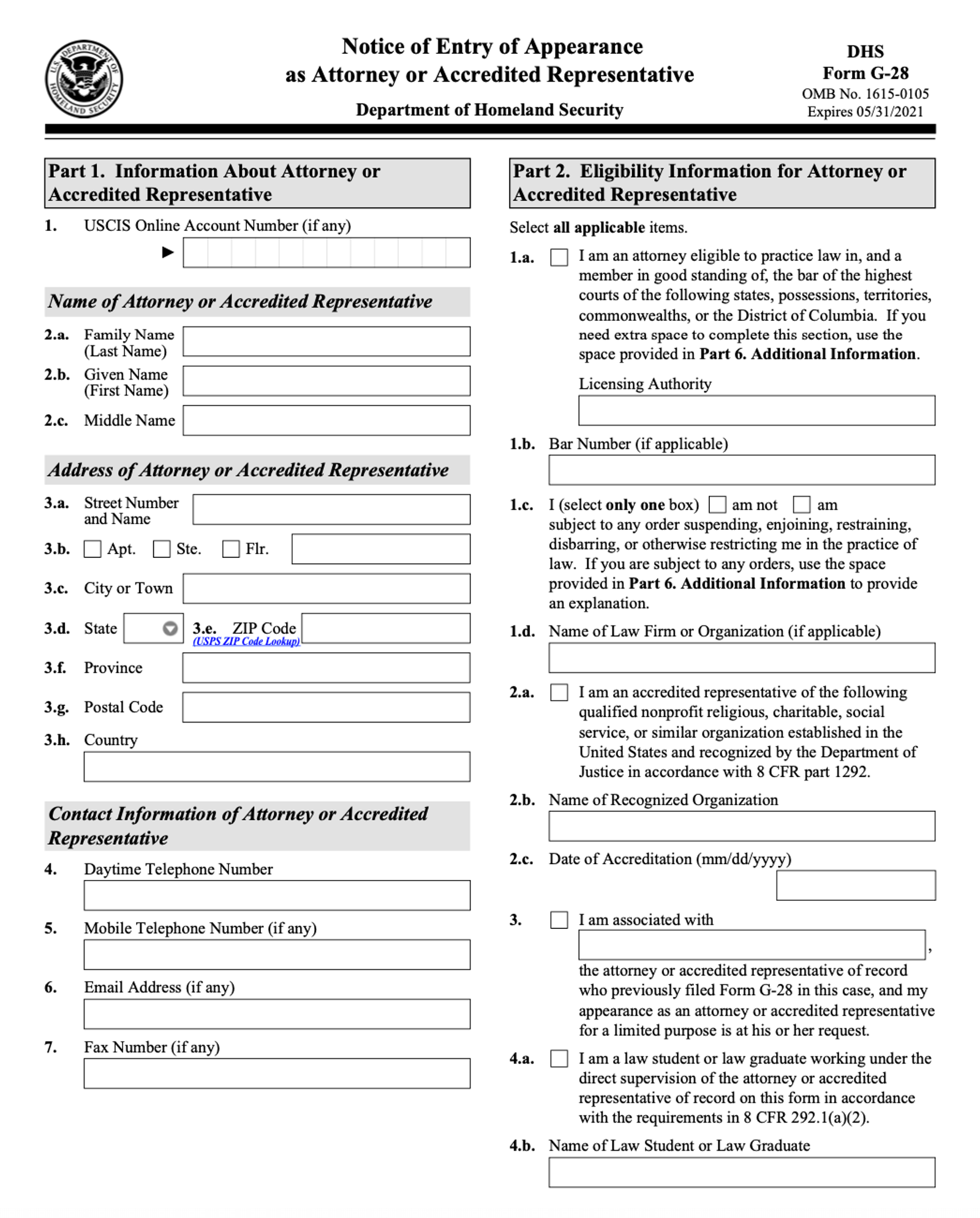
Form G-28

Form G-28 is a U.S. Department of Homeland Security (DHS) form issued by U.S. Citizenship and Immigration Services (USCIS). The form allows an applicant for immigration benefits or relief to appoint a legal representative to appear on their behalf in immigration proceedings. The legal representative can be one of the following:

  • Attorney. An attorney specializing in immigration law is preferable.
  • Accredited representative. This is a non-attorney who is approved by the Board of Immigration Appeals to appear in immigration proceedings. A fully accredited representative can appear before the Board of Immigration Appeals, the immigration courts, or the DHS. A partially accredited representative can only appear before DHS. The representative must be an employee or volunteer of an accredited organization, which is generally a non-profit religious, charitable, or social service organization.
  • Law student or law graduate. The student or graduate must be working under the direct supervision of an attorney or accredited representative.

Who should use Form G-28?

Any non-citizen who is either (1) submitting an immigration-related application, like a green card application, or (2) involved in removal proceedings, and wants to hire a representative, should submit Form G-28.

The form must be signed by both the applicant and their representative. It enables the representative to access the applicant’s U.S. immigration file and send and receive correspondence from U.S. immigration authorities on the applicant’s behalf.

How to complete Form G-28

This form will generally be completed by the legal representative and contains the following sections.

Information about the legal representative

This section, entitled “Part 1: Information About Attorney or Accredited Representative”, is where the representative includes their name, address, and contact information. They must also include their USCIS online account number.

Eligibility information for the representative

Part 2 is entitled “Eligibility Information for Attorney or Accredited Representative.” This section is where the representative indicates whether they are an attorney, accredited representative, or law student/graduate supervised by an attorney or accredited representative.

An attorney must indicate the jurisdiction where they are licensed and their bar number. In addition, they must disclose whether they are subject to any suspension, disbarment, or other restriction on their ability to practice law. If the attorney is subject to such an order, they must provide an explanation in “Section 6: Additional Information.”

In the case of a law student or law graduate, their supervising attorney or accredited representative is the one whose information appears in Part 1. This section will include the name of the law student or graduate, and they will also sign the form in Part 5.

Notice of appearance

Part 3 is entitled “Notice of Appearance as Attorney or Accredited Representative.” In this section, the representative indicates the DHS agency handling the immigration matter:

(1) USCIS,

(2) U.S. Immigration and Customs Enforcement (ICE), or

(3) U.S. Customs and Border Protection (CBP).

The specific matter in which appearance is entered must be listed as well. Finally, the client’s name, address, and contact information must be included, along with their USCIS online account number and their alien registration number.

Client’s consent to representation

In Part 4, “Client’s Consent to Representation and Signature,” the client’s signature serves as the client’s consent to representation by the designated representative. Here the client can also check a box indicating if they want original notices sent by USCIS to the legal representative instead of the client. In addition, the client can indicate that they want secure identity documents, such as resident cards, sent to their legal representative.

The form must be signed in Part 5 by the attorney or accredited representative, as well as the law student or graduate (if applicable). There is no filing fee for Form G-28.

Improve document drafting at your firm

Clio Work cuts your drafting time by 80% with auto-fill, templates, and court forms—all seamlessly integrated with Microsoft Word. Draft smarter, not harder.

Benefits of filing Form G-28

Legal representation is often critical in immigration proceedings. This is obviously true for removal or deportation proceedings, especially where there is some difficulty with the client’s background, such as a criminal record or prior immigration violation. The representative can also ensure all the submitted forms are complete, accurate, and mistake-free, which will streamline the application process.

It is also beneficial for a client to have their legal representative receive correspondence, since they will likely have a stable address and systems in place to track case information. Even if the client is also receiving correspondence, it is invaluable to have their attorney or accredited representative acting as a backup.

Common mistakes to avoid

The following are some of the most common mistakes with Form G-28:

  • Incomplete or inaccurate information. Any mistakes on this form can be time-consuming and expensive to fix, while an error-free Form G-28 will expedite your application process.
  • Submitting an outdated version of Form G-28. Be sure to visit the USCIS website for the most up-to-date version of the form, since the U.S. government will not process outdated forms.
  • Failure to submit employment authorization for employment-related matters. An employment authorization document (EAD), commonly known as a work permit, must be submitted for any employment-related immigration case.
  • Confusion with Form E-28. Form E-28 is for appearing in immigration court, so do not confuse it with Form G-28.

Immigration attorneys and accredited representatives must know Form G-28 well

For immigration attorneys, accredited representatives, or any law students or graduates appearing under their supervision, Form G-28 is a critical document. While the form itself is fairly straightforward, small mistakes can throw a monkey wrench in even the simplest of immigration proceedings.

Following the guidelines above can help you ensure your appearance proceeds with smooth sailing. Accordingly, ensure you understand Form G-28 well as a precursor to providing top-notch representation to your immigration clients.

Are you drafting court documents on a daily basis and interested in improving your firm’s productivity? Transform your legal practice today with Clio Draft, the solution that reduces document drafting time by 80%. Automatically fill legal court forms, create reusable templates, and complete pleadings and motions with unprecedented efficiency. Elevate your practice today with Clio Draft.

Disclaimer: This article is provided for informational purposes only. It does not constitute legal, business, or tax advice.

Browse More Legal Forms

Explore our forms library to find, download, and learn more about commonly used legal documents—including federal IRS forms and state-specific court forms.


Pixelated map of the United States with California labeled "CA".

California Legal Forms

Browse and download commonly used California court forms across a range of practice areas and legal needs.

View Forms
A minimalist table or list interface with a highlighted item and a checked item.

IRS Legal Forms

Browse and download frequently used IRS forms to assist with client tax matters and your firm’s compliance needs.

View Forms

Legal runs on Clio.

Have questions?

Call 1-888-858-2546 or email sales@clio.com. Our sales team is available Monday to Friday from 8am to 8pm EST.

Get in touch with us

Company

  • About Clio
  • Careers We’re hiring
  • News & Press

Products

  • Clio Manage
  • Clio Work
  • Clio Grow
  • Clio Operate Enterprise
  • Vincent by Clio Enterprise
  • Integrations

Features

  • Billing & Collections
  • Case Management
  • Client Intake
  • Document Management
  • Task Management
  • What’s New
  • See All Features

Resources & Events

  • Upcoming Events
  • Customer Stories
  • ClioCon
  • Legal Trends Report New
  • Compare Clio
  • Blog
  • Clio Reviews

Community

  • Customer Community
  • Bar Associations
  • Incubator Program
  • Referrals
  • Academic Access
  • Channel Partner Program

Support

  • Help Center
  • Data Migration
  • Developer Hub
  • Find a Consultant
  • Clio Academy
  • Subscribe
  • Contact Us

Links

  • facebook
  • twitter
  • linkedin
  • youtube
  • instagram
  • Download on the App Store
  • Get it on Google Play
  • Terms of Service
  • Legal Service
  • Trust Centre
  • Privacy Policy
  • Cookies
  • GDPR
  • Accessibility
  • AI Principles
  • Customer Code of Conduct

© 2008–2026 Themis Solutions Inc. (Clio)

  • US/Global
  • Australia
  • Canada
  • Ireland
  • United Kingdom