
To leverage Generative AI for profitability and effectiveness while mitigating professional risk, lawyers must prioritize intentional selection, training, and supervision:
- Choose secure, legal-specific tools like Clio Work, which are
grounded in real statutes and case law and offer security certifications like SOC 2 Type II and Zero Data Retention. - Maintain ultimate professional responsibility by
verifying all facts, citations, and reasoning of AI-generated content, just as you would with a junior colleague. - Implement an AI content checklist—including checking for bias, correct jurisdiction, and ethical compliance—and require final human sign-off on all work released to clients or courts.
Lawyers are already using AI as a force multiplier for legal work, from client emails to legal research, summaries, and analyzing legal documents such as contracts or complaints. AI tools have many advantages, such as higher accuracy, thoroughness, and productivity for nonbillable work. But there are obvious risks as well. Without proper review, AI hallucinations and data privacy issues can put firms at risk.
One important way to manage risk is to use the right tools. An important lesson from the first few years of generative AI is that there are important differences between general-purpose (or “foundation”) generative AI tools such as ChatGPT, and legal-specific tools such as Clio Work, which is powered by the leading legal AI tool Vincent.
See how Clio’s Intelligent Legal Work Platform works in practice. Book your demo today.

Why reviewing AI-generated content matters
Generative AI can accelerate legal work, but it cannot replace the lawyer’s judgment. These systems predict what legal text should look like, they do not reason about doctrine, jurisdiction, or consequences. That’s why even fluent, well-structured answers can be subtly wrong or confidently hallucinated.
Legal-specific tools like Clio Work and Vincent AI dramatically reduce these risks by grounding every response in real statutes, cases, and regulations. But grounding is not the same as supervision. Under the Model Rules, lawyers remain responsible for verifying citations, checking reasoning, and ensuring that AI-assisted work meets the same standard we’d expect from a junior colleague.
Review is how we turn AI from a clever language generator into a reliable part of the legal workflow. It keeps efficiency from becoming error, and ensures that clients receive not just faster work, but sound work backed by human judgment.
The right tool matters
Legal-specific AI tools such as Clio Work feature security certifications such as SOC 2 Type II and ISO 27001, as well as “Zero Data Retention” agreements, which guarantee that confidential information remains confidential and isn’t used to train an AI model.
AI tools that are grounded in legal databases are also the best defense against hallucinations. For example, Clio Work is grounded in the vLex and Fastcase legal research databases (now called Clio Library) and can ensure that answers are based only on current judicial opinions, statutes, and regulations. The general purpose models aren’t grounded in law, and use next-word or next-token approximations. These average answers make beautiful and compelling citations—even with perfect Bluebook format—but to cases that do not actually exist.
Over the last few years, more firms have turned to legal-specific tools such as Clio Work, which provides reliable legal data and built-in security features, designed to meet the security and transparency demands of leading law firms.
The AI-generated content checklist for lawyers
As any pilot can tell you, one great way to manage risk is the use of a safety checklist. A clear, repeatable checklist can help lawyers safely use AI while maintaining accuracy, ethics, and client trust.
With that in mind, here is a repeatable checklist of ten recommendations for using AI tools in legal work for clients:
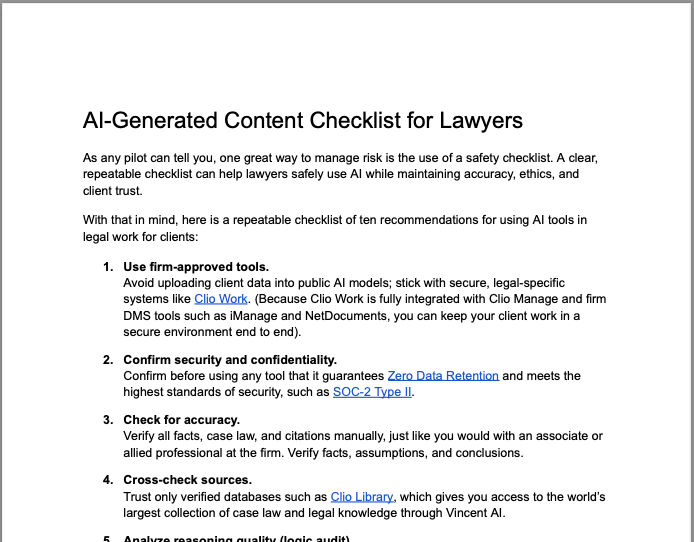
Free download: AI-Generated Content Checklist for Lawyers
- Use firm-approved tools. Avoid uploading client data into public AI models; stick with secure, legal-specific systems like Clio Work. (Because Clio Work is fully integrated with Clio Manage and firm DMS tools such as iManage and NetDocuments, you can keep your client work in a secure environment end to end).
- Confirm security and confidentiality. Confirm before using any tool that it guarantees Zero Data Retention and meets the highest standards of security, such as SOC-2 Type II.
- Check for accuracy. Verify all facts, case law, and citations manually, just like you would with an associate or allied professional at the firm. Verify facts, assumptions, and conclusions.
- Cross-check sources. Trust only verified databases such as Clio Library, which gives you access to the world’s largest collection of case law and legal knowledge through Vincent AI.
- Analyze reasoning quality (logic audit). Check whether the AI follows IRAC/CRAC, uses correct doctrinal tests, avoids blended jurisdictions, and provides reasoning (not just conclusions).
- Map all content to the correct jurisdiction. General AI frequently mixes federal/state or provincial rules. Verify that the content reflects the correct region’s laws, terms of art, definitions, and standards.
- Look for bias. Ensure the content doesn’t misrepresent the holdings of cases or use biased examples. Generative AI can reflect bias in training data, sometimes unintentionally.
- Confirm court formatting and procedural compliance (if applicable). Check margins, headings, case caption format, signature blocks, required clauses, and exhibit treatments. AI often gets formatting wrong or fails to capture local requirements.
- Ensure ethical compliance. Follow ABA Model Rules, state rules of professional responsibility, or Law Society guidance on AI-assisted work.
- Require final human sign-off. Every piece of AI-generated work must be verified and reviewed by a lawyer before release to a client, court, or opposing counsel.
Safe AI usage for lawyers—best and worst practices
Based on the early reports from law firms and corporate legal departments, here are some best practices, and some practices to avoid, when using GenAI for legal work:
Best practices:
- Be thorough in evaluating tools. Make sure they are SOC 2 Type II certified and grounded in real law from reputable sources. Make sure the service offers a citator and training options. Just because you’ve heard of a brand or used a legacy brand in the past doesn’t mean it is the best tool for the job.
- Use general-purpose GenAI for summarization, outlining, marketing copy, and automation, but definitely not for finding the law or for legal-specific tasks.
- Store all AI drafts within secure, cloud-based platforms like Clio. Whenever possible, keep client confidential work within a secure environment instead of uploading to third-party services.
- Set firm policies around GenAI usage and involve compliance officers in policy development.
- Invest in ongoing training for staff, both lawyers and allied professionals.
Practices to avoid:
- Never copy AI-generated text directly into filings or marketing materials without verifying cited sources.
- Never upload confidential client data into public tools. Model Rule 1.6 and your engagement letter require that you protect the confidentiality of client confidences.
- Never assume that AI replaces proofreading or legal review. Model Rules 5.1 and 5.3, as well as Rule 11 of the Federal Rules of Civil Procedure insist that the supervising attorney is ultimately responsible for the work of the entire team, including generative AI work performed by others.
Human review is as important as ever

Senior lawyers have grown accustomed to reviewing the work of junior lawyers, paralegals, and allied professionals in the firm. We notice mistakes of grammar and logic in our peers, and we can guide the work of teammates. This kind of supervision is an essential part of serving clients. In fact, the Model Rules of Professional Conduct require that we supervise other lawyers working on a matter (Rule 5.1) as well as supervising allied professionals at the firm (Rule 5.3).
Supervising the work of AI is just as essential. The 2025 Legal Trends Report shows that 79% of lawyers are using AI to improve their practice. Even though the products of AI tools have stronger grammar and logical structure, general-purpose AI tools can have important and less obvious errors. AI can speed up drafting, summarization, and research—but it can also “sound right” while being wrong. When supervising attorneys don’t catch these errors, it can result in false citations, confidentiality breaches, and reputational harm.
The kind of review that’s appropriate depends on the tool you’re using, and this is true when working with human teammates as much as it is when working with AI. When an associate performs research for a pleading, you’re required under the Model Rules, as well as Rule 11 of the Federal Rules of Civil Procedure, to read and verify the cited authorities before including them in a court document.
This is also true when using legal-specific AI such as Clio Work and Vincent AI. Even though these tools are grounded in law and are safe to use for legal work, lawyers are nevertheless responsible for verifying the authorities, just like working with an associate. Clio Work also makes that verification easier by providing direct links to the cited authorities, so legal professionals can confirm the underlying sources with a single click.
General-purpose AI tools that are not grounded in law are much, much riskier to use for legal work, so the supervision required is much greater. General AI tools might be great for draft marketing copy or drafting e-mails. But lawyers should be careful to exercise independent reasoning and judgment and triple-check any work from ungrounded general AI tools, if they choose to use them for legal work.
How successful law firms are using AI in practice
Firms that use AI well aren’t replacing legal judgment, they’re redesigning the workday so lawyers can focus on higher-value analysis while AI handles the heavy lifting. A typical day now looks something like this:
Morning: Vincent AI surfaces what matters most by summarizing overnight filings, new case law, and relevant updates from the firm’s jurisdictions. Lawyers start their day informed, not overwhelmed.
Midday: Manage AI drafts client updates, email responses, and matter summaries for review. Lawyers edit, refine, and approve, turning first drafts into final drafts in a fraction of the time.
Afternoon: Clio Work streamlines the heavy lifting, reviewing key cases in Clio Library, extracting the rules with Vincent AI, and shaping a quick outline so drafting comes naturally.
A Legal Professional's Guide to Not Getting Flagged for AI Use
Thinking about using AI in your practice? Learn how to do it responsibly, while staying compliant, protecting your reputation, and avoiding disciplinary risk.
Watch now

Building firmwide confidence in AI
It’s important to emphasize that, when used responsibly, GenAI can be an extremely powerful lever to increase the profitability and effectiveness of legal work. In getting your team to adopt Generative AI, you should lead by example. If it’s important to you, your firm should see you experimenting with the tools (conversely, if they don’t see you using AI, they will understand that it’s not important).
You should empower your team to try new ways of working, and even to try some things that don’t work. This might be the best way to understand the limitations of AI tools, and why human oversight is so important. As always, guardrails, grounding, transparency, and supervision help keep that kind of experimentation inside a safe and secure environment (and off of the public Web).
Firms have had great success designating AI champions to share helpful use cases with teammates. Similarly, many have identified “AI reviewers” to manage approvals and quality control.
The team at Clio has worked closely with law firms and corporate legal departments of all sizes as they have deployed Vincent AI and Clio Work to modernize the way they deliver legal services. We’re here to help others as they navigate this journey. In addition to reaching out to our team, you can also find lots of helpful resources online from Clio:
- Find more information about “context engineering,” using grounded legal AI within the secure context of Clio using Clio Work
- Clio’s comprehensive guide to AI for lawyers covers everything you need to know from billable hours to research to certification
- Clio’s template for law firm AI policy statements
- Clio’s 2025 Legal Trends Report
Generative AI is a once-in-a-generation change in the way that law firms deliver legal services to clients. Its effective and responsible use requires skill, supervision, and practice. The latest Legal Trends Report highlights the promise: Firms that integrate AI responsibly grow four times faster and report higher satisfaction. With intentional selection, training, and supervision, your firm can build client satisfaction, team skills, and profitability all at the same time.
Build your firm’s AI confidence with Clio. Explore how our legal-specific AI helps you work smarter and safer.
Book a Clio demoSubscribe to the blog
-


Software made for law firms, loved by clients
We're the world's leading provider of cloud-based legal software. With Clio's low-barrier and affordable solutions, lawyers can manage and grow their firms more effectively, more profitably, and with better client experiences. We're redefining how lawyers manage their firms by equipping them with essential tools to run their firms securely from any device, anywhere.
Learn More