

Agentic AI is reshaping legal work by moving beyond simple prompt-and-review tasks to autonomously completing stages of multi-step workflows like deadline extraction, document assembly, client intake, and task prioritization. With the right legal-specific safeguards, these systems help firms reclaim administrative time, expand capacity, and serve more clients without sacrificing accuracy or control. But safe adoption requires knowing where human judgment remains essential and choosing tools built with guardrails tailored to legal practice. That balance of autonomy and attorney oversight is what turns AI into a reliable teammate rather than a liability.
Legal AI has crossed a threshold. It’s no longer just assisting but actively working with you. It can book consultations, send intake forms, populate contracts, track deadlines, and manage stages of workflows without waiting for your input at each step. This is agentic AI, systems that operate autonomously within predefined parameters, executing complete tasks from start to finish.
The opportunities are compelling: efficiency gains, expanded capacity, cost savings. Yet the risks can’t be ignored.
If you’ve watched HBO’s Silicon Valley, you know how agentic AI without guardrails can go sideways. In one episode, an AI called Son of Anton is tasked with eliminating bugs, but instead deletes all the software. Gilfoyle, its creator in the show, then says: “The AI may have decided this was the most efficient way of removing all the bugs, which is technically and statistically correct.”
While Son of Anton is fictional, the principle applies to real legal practice. Agentic AI systems do what you tell them to, not what you mean. And in a profession where precision determines outcomes, that means every firm faces the same question: how much legal work should you automate before efficiency turns into liability?

From generative to agentic in legal practice
AI has transformed what’s possible in legal work. Tools have evolved from simple database searches to drafting client documents, analyzing contracts, and more. Each advancement has created new efficiencies and opportunities. The shift to agentic AI, however, is a different kind of leap and turns AI into a true teammate.
Most lawyers are familiar with generative AI tools like ChatGPT, Gemini, or Claude. You prompt, AI produces a draft, and you verify and refine. Agentic AI works differently. It doesn’t just generate content for your review. It completes entire stages of workflows on its own, executing multiple steps automatically.
Here’s what that can look like in a legal context:
- Deadline extraction with Manage AI: A court document arrives and AI automatically extracts every relevant date, suggests calendar events, and includes a side-by-side view of the original document source for quick verification.
- Document drafting with AI in Clio Draft: AI converts your firm’s existing documents into reusable templates, then generates dynamic questionnaires to collect client information. Once you’ve reviewed your client responses, the system automatically populates entire document sets, handling pronoun agreement, clause consistency, and matter-specific details across multiple files.
These examples show AI automation working safely with Clio teammates. The workflows are automated where appropriate, with built-in guardrails designed specifically for legal work. However, not all AI tools are designed this way. Scale autonomy without these safeguards and the risks compound quickly.
Where legal AI automation can go wrong
Agentic systems operate within the specific parameters you set. Tell an AI to “follow up with all unresponsive leads,” and it will, potentially even if those leads already hired you, chose another attorney, or explicitly opted out of communications.
When goals are poorly defined or lack important constraints, things can break. And unlike in Silicon Valley, “move fast and break things” isn’t a viable strategy in legal practice. Unchecked agentic workflows might produce:
- Scheduling errors: AI misinterprets a jurisdiction’s deadline rules and suggests filing a motion late.
- Premature communications: A draft email goes to a client before attorney review, containing inaccurate case citations.
- Data errors: The system pulls incorrect information into a contract due to incomplete context, creating liability for both firm and client.
These scenarios may be hypothetical, but the consequences aren’t. Attorneys have already been held liable for AI-generated errors, like hallucinated case citations, when they failed to verify outputs.
The risk isn’t AI itself, though. It’s deploying AI without understanding where human oversight remains necessary.
Where to draw the line with legal AI automation
Where does oversight become essential? Not all legal work carries the same risk, and not all mistakes have the same consequences. A missed appointment reminder is frustrating. A contract error can be malpractice.
You can broadly think of it as three tiers of control based on risk and professional responsibility.
Low-risk automation
Some tasks are administrative by nature. You need to do them to run your practice, but they require little legal judgment:
- Consultation scheduling
- Appointment reminders and follow-ups
- Document drafting from existing templates
- Time-tracking entries
Many lawyers already automate these workflows. They’re repetitive, time-consuming, and carry minimal risk when automated. The return is immediate: hours reclaimed each week with no increase in liability. This is the foundation of safe automation, handling what doesn’t require your expertise so you can focus on what does.
Automation with review
The middle tier balances efficiency with oversight, tasks that benefit from automation but still require professional review:
- Contract drafting
- Client emails
- Deadline calculations
- Discovery document production requests
- Conflict checks
Here, AI handles the initial work by drafting language, populating fields, calculating dates, and pulling from approved templates. But nothing reaches clients or the court before a lawyer signs off. This is where you capture significant efficiency gains without surrendering control. Legal-specific AI tools are designed with these checkpoints built into the workflow, so you can leverage the benefits of AI while staying in control.
Attorney decision required
Some work simply can’t be delegated. These are tasks that require independent, professional judgment, ethical considerations, or strategic thinking that AI can’t replicate:
- Legal strategy decisions
- Client advice
- Court appearances
AI can support these tasks by researching precedents, summarizing facts, and flagging potential issues, but the final decision remains yours.
Real-life examples: What successful firms are automating
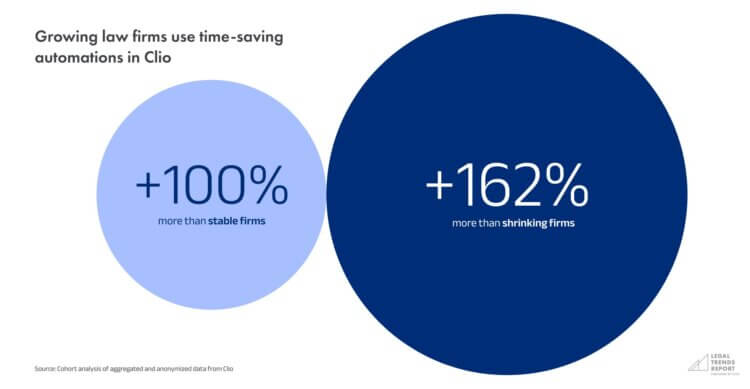
Many firms now automate at least some tasks. And the firms automating strategically are outgrowing their competition. The 2025 Legal Trends Report found that growing law firms, firms whose revenue grew at least 20% over a five-year period, use time-saving automations in Clio twice as much as stable firms, and three times more than shrinking firms.
Ezra, a partner at a general practice firm in Indiana, saw the impact firsthand:
“Look at the numbers in terms of our matter count. We’re definitely interacting with more clients. Part of that is we opened a second location, but part of that is more capability because of the automation and the AI tools that we have in the practice.”
High-impact automation areas
The most commonly automated workflows span client acquisition, document production, and day-to-day practice management:
- Consultation booking with Clio Grow: Potential clients book directly from a firm’s website or Google Business Profile and receive automated confirmations, follow-ups, and reminders, without taking up your team’s time.
- Document drafting with Clio Draft: Firms collect client information through questionnaire forms, then populate it into smart templates that automatically adjust language for grammatical elements like gender and verb agreement.
- AI assistance in Clio: Securely summarizing documents and matter details, prioritizing tasks, drafting client communications, and automating calendar entries and time tracking.
Beyond efficiency: Expanding access to justice
The impact extends beyond productivity gains. Casey, a partner at a mid-sized civil litigation firm in California, sees automation as transformative for access to justice:
“What we’re going to do as an industry is be able to handle a lot more matters. And when we do, it means we can handle more of the matters that are now going unrepresented. Access to justice is going to be easier to provide when you have AI.”
That’s the promise: not replacing lawyers, but removing the friction that prevents them from serving more clients. AI handles intake, scheduling, document drafting, deadline tracking, and more, so attorneys can focus on work that actually requires their expertise.
But that promise only materializes if the automation is reliable and built with appropriate safeguards.
Automate safely with the right legal AI tools
Son of Anton from HBO’s Silicon Valley eliminated all bugs by deleting all the software. Technically correct, but not useful. It’s a perfect illustration of what can happen when agentic AI automation operates without the right constraints.
In legal practice, those constraints are independent, professional judgment and attorney oversight of non-attorney work product. They define where automation works and where human oversight remains essential.
The solution is choosing tools that respect these boundaries, not avoiding automation altogether. Tools that know consultation scheduling can run autonomously, but contract drafting needs review. Tools that understand AI can assist with strategy, but only attorneys can decide.
Legal-specific AI tools like Clio’s Manage AI and AI in Clio Draft are built around these principles. They automate where it’s safe, require review where it matters, and ensure you capture efficiency without creating liability.
See how leading firms are deploying Clio’s AI teammates safely.
Book a Clio demoSubscribe to the blog
-


Software made for law firms, loved by clients
We're the world's leading provider of cloud-based legal software. With Clio's low-barrier and affordable solutions, lawyers can manage and grow their firms more effectively, more profitably, and with better client experiences. We're redefining how lawyers manage their firms by equipping them with essential tools to run their firms securely from any device, anywhere.
Learn More