
-

Simple, transparent pricing
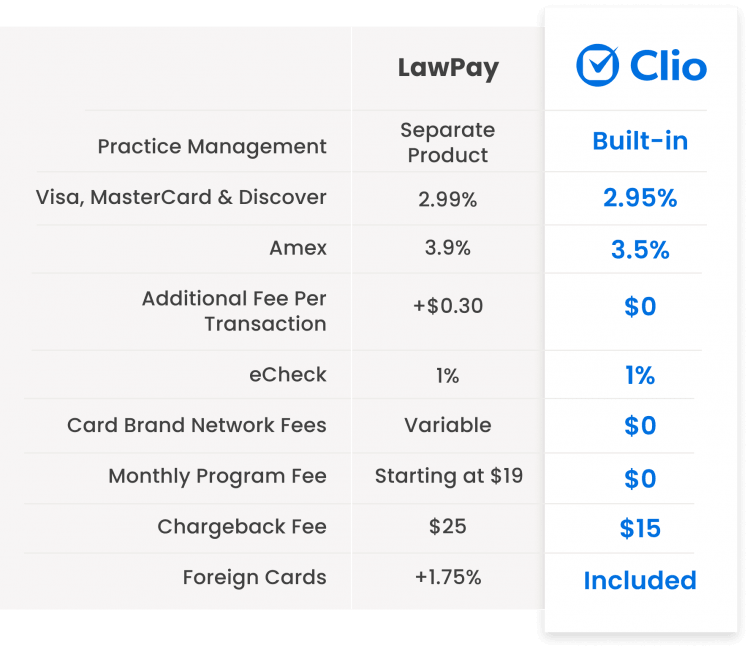
Get competitive processing rates* with no hidden fees. Clio never passes on card brand network fees, so you’ll always know exactly what you’re paying. Complete a complimentary assessment to understand your processing rates with Clio Payments.
*Firms switching from the LawPay Integration to Clio Payments qualify for a 3.5% American Express processing fee.
Better for your clients. More efficient for you.
Switch to Clio Payments to unlock more ways for clients to pay and for you to get paid. More flexibility for your clients, more confidence for your firm.
LawPay Integration

LawPay Integration
All-in-one practice management
All-in-one practice management
Show Less
LawPay Integration
Third-party platform
Requires managing payments and client information in two different places.
Already built into Clio
Built by Clio and included with your Manage subscription, Clio Payments lets you manage your clients, matters, billing, reporting and payments from one place. Payments are automatically recorded against the correct matter and synced to your accounting platform.
Debit and credit card processing rates
Debit and credit card processing rates
Show Less
LawPay Integration
Variable rates and additional fees for every card type
Foreign cards cost extra and per transaction costs are charged on all cards.
Transparent, flat rate for all card types
Pay one low rate of 2.95% for all standard cards and 3.5% for American Express*—with no per-transaction fees.
Surcharging is also supported in eligible states.
*Firms switching from the LawPay Integration to Clio Payments qualify for a 3.5% American Express processing fee.
Card network fees
Card network fees
Show Less
LawPay Integration
Additional fees may apply
Additional card network fees are typically applied to most transactions.
No card network fees
Clio doesn’t pass on card network fees when you run a card. Always know what you’re paying with one simple, flat rate per transaction and no hidden fees.
Text to Pay
Text to Pay
Show Less
LawPay Integration
Not available
No ability to send bills, trust requests, and client balances to clients by text message.
Built-in capabilities to text bills to clients
Send instantly-payable bills, trust requests, and client balances to clients by text—so you collect faster.
Google Pay & Apple Pay
Google Pay & Apple Pay
Show Less
LawPay Integration
Not supported
Clients must manually type in card numbers, expiry dates, and CVVs for every bill.
Included for all transactions
Let clients pay online instantly using stored cards on Apple Pay or Google Pay. By removing the need for a physical card, you make it possible for clients to pay the moment they see your invoice.
Pay Later
Pay Later
Show Less
LawPay Integration
Not supported
Pay Later with Affirm is not supported.
Included for all transactions
Give your clients the flexibility to Pay Later with Affirm while your firm gets paid the full amount upfront (net of fees). You choose whether to offer it, allowing clients to break large bills into smaller, monthly instalments.
eCheck & Direct ACH payments
eCheck & Direct ACH payments
Show Less
LawPay Integration
Not available
eCheck and Direct ACH are not supported.
Included for all transactions
Accept direct ACH and eCheck payments for just 1% per transaction. Offer both methods, so clients can choose to pay via Plaid or pay directly into your bank account, through the ACH network.
In-person payments
In-person payments
Show Less
LawPay Integration
Manually record payments
In-person payments must be keyed in manually.
Multiple options to get paid quickly and easily
Turn your phone into a payment terminal. Collect in-person payments in seconds via QR codes, or directly from your phone using Tap to Pay. With no extra hardware required, you can settle bills on the spot and get on with your day.
Mobile-friendly client portal
Mobile-friendly client portal
Show Less
LawPay Integration
Not available
Client portals are not supported.
Share bills and get paid with Clio for Clients
Share bills and get paid through Clio’s secure, mobile-friendly client portal.
Payment plans
Payment plans
Show Less
LawPay Integration
One payment plan per client
Create only one payment plan per client, without the ability to accept eChecks. No ability to edit payment plans after they’re live.
Multiple plans per client
Total flexibility for you and your clients. Easily manage multiple plans across different matters and accept both cards and eChecks. Clio lets you edit active plans on the fly or set up recurring payment schedules for ongoing work—keeping your cash flow steady without the admin rework.
Payment storage
Payment storage
Show Less
LawPay Integration
Securely store credit card information
Payment information can only be stored when clients are making a payment. No ability to request payment information separate from a bill, or at intake.
Securely store multiple payment methods, at any stage of the process
Easily request and store payment methods at intake, over the phone, or by sharing a secure link. Save payment information with the highest level of PCI compliance at any time during your client’s case.
Autocharge
Autocharge
Show Less
LawPay Integration
Not supported
Supports recurring payment schedules only—no ability to automatically charge a stored payment method based on set triggers.
Collect payments automatically, on your terms
Set your trigger (e.g. bill approval or due date) and Autocharge charges a client’s stored payment method automatically. No manual steps, no chasing.
Chargeback support
Chargeback support
Show Less
LawPay Integration
Managed in LawPay
Chargebacks can only be managed by logging into the LawPay portal.
Easily navigate and handle chargebacks
Get notified about chargebacks by email. Handle the chargeback process and view your progress right in Clio Manage.
Ability to choose how processing fees are incurred
Ability to choose how processing fees are incurred
Show Less
LawPay Integration
Monthly only
Processing fees are billed and deducted monthly.
Choose daily or monthly
It’s up to you when fees are incurred: per transaction, or in one lump sum each month.
Refund management
Refund management
Show Less
LawPay Integration
Operating account refunds only
No support for refunding IOLTA (trust) transactions, meaning you can only refund operating payments.
Full refund flexibility
Manage all of your accounts with ease. Issue full or partial refunds for both trust and operating payments directly within Clio—without any workarounds.
A legal payment solution you can rely on, built directly into Clio
-
Industry-compliant trust accounting
Full protection of your trust accounts so you remain compliant with all IOLTA rules. Includes built-in support to issue trust refunds, if required.
-
Fast, unlimited support
Get support from one team, instead of two—by phone, email, or live chat.
-
Secure, PCI-compliant payments
Safely accept, process, store, and client payment information.
Thousands of legal professionals have already made the switch to Clio Payments
The Clio Payments Advantage
Why is a built-in legal payment system better than an integration?
Built-in payment systems keep billing, matters, reporting, and transactions in one workflow, eliminating the need for manual data entry and reconciliation.
Does the LawPay integration offer the same payment methods as Clio Payments?
No. The LawPay integration only supports card payments, while Clio Payments supports a wider range of options, including Apple Pay, Google Pay, direct ACH, eCheck, and Pay Later with Affirm. Offering more choices helps your firm collect payments faster.
Do Clio Payments and LawPay have the same fee structure?
No. LawPay adds a per-transaction fee, and typically passes on additional card network fees. Clio Payments offers transparent, predictable pricing with one standard rate for each card type and no per-transaction fees, making it easy for firms to forecast their costs.
Trust & Compliance
How does Clio Payments ensure IOLTA compliance?
Clio Payments is purpose-built for legal professionals. It ensures IOLTA compliance by strictly separating trust and operating funds. Any processing fees or chargebacks are exclusively deducted from your operating account, ensuring client trust funds remain protected at all times.
Is Clio Payments PCI compliant?
Yes. Clio Payments meets the highest level of certification available in the payments industry. The processing, transmission, and storage of all card data are handled securely to ensure your firm remains fully PCI compliant.
How does Clio Payments reduce accounting errors?
Since Clio Payments is built-in, payments are automatically recorded against the correct matter and synced with your firm’s records in real-time — keeping your books accurate.
Making the switch
Is switching from LawPay to Clio Payments difficult?
Making the transition is easy. Since Clio Payments is already a part of Clio Manage, you can activate it without disrupting your existing billing workflows. Your invoices and collection processes will remain consistent throughout the transition.
How will my clients be impacted if I switch?
Clients will gain more ways to pay, with zero disruption to your firm. The only required update is swapping any “permanent” payment links on your website with your new Clio Payments links.
How do I sign up for Clio Payments?
Signing up is simple. Navigate to the Switch to Clio Payments tab within Clio Manage and follow the prompts. If you’d prefer a guided experience, you can book a call with our team, and one of our experts will walk you through the setup.