

AI is transforming both the practice and business of law. Across the legal workflow, it supports a wide range of use cases, including legal research, drafting and document automation, contract review, litigation preparation, document analysis, court calendaring, client communication, and billing. By reducing time spent on repetitive and administrative tasks, legal-specific AI helps lawyers work more efficiently, improve accuracy, strengthen firm performance, and deliver higher-quality service to their clients.
Think about last week. How many hours did you spend searching through case law, tracking deadlines, or writing routine correspondence?
How much of that work actually required your legal expertise?
Today, AI use cases in law span everything from legal research to document drafting to deadline management. With your oversight, AI becomes your powerful assistant and gives you back hours for the work that actually requires your judgment, from strategy and client counsel to complex legal analysis.
Seventy-nine percent of legal professionals are already using AI, according to the 2025 Legal Trends Report, and those who’ve adopted it report benefits such as improved work quality, better client responsiveness, increased work capacity, higher profitability, and increased competitiveness.
Below, we break down practical ways to use AI in your practice today and how to implement it safely, so you can capture these same benefits and grow your practice without compromising accuracy, ethics, or client trust.

Discover what AI can actually do for your firm.
Clio’s secure, legal-specific AI is built to support research, drafting, and everyday legal workflows.
Top AI use cases in law across the legal workflow
Here’s how AI supports lawyers in both the practice of law and the business of running a firm.
AI in the practice of law
Legal practice requires thorough research, careful drafting, and detailed analysis. It’s demanding work, and the volume often keeps increasing. More cases, tighter deadlines, higher client expectations.
Over time, this can create cognitive overload that affects your effectiveness and mental well-being. AI can help. Regardless of your practice area, the most impactful AI use cases for lawyers involve supporting you across tasks so that instead of starting from scratch, you start from structured outputs you can review and refine.
The 2025 Legal Trends Report found that lawyers adopting legal technology like Clio report a 25% reduction in cognitive load, making their teams more effective.
Here are the workflows where AI can have the biggest impact.
Legal research
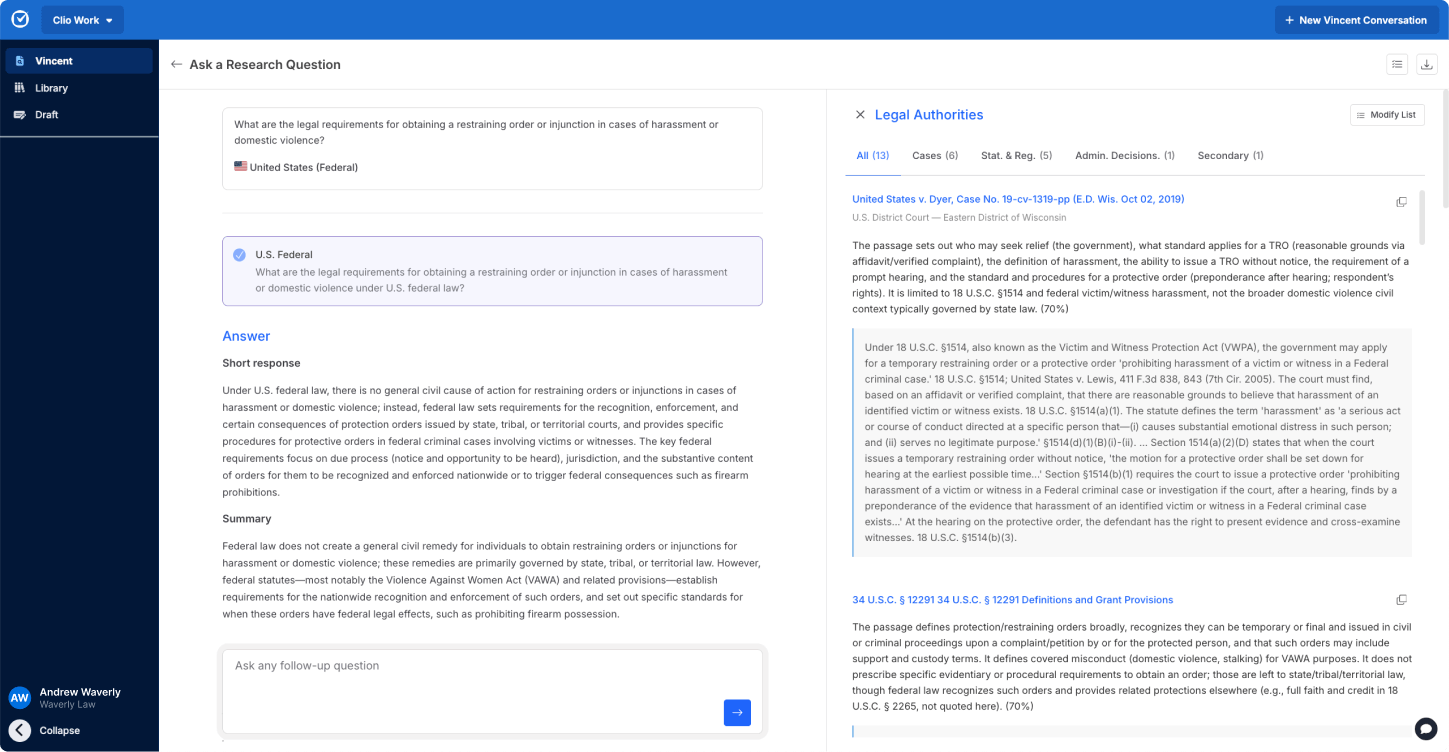
AI-powered legal research in Clio Work.
The ABA’s 2024 Legal Technology Survey found that legal research typically consumes nearly 20% of a lawyer’s working hours. AI cuts that time significantly by searching vast libraries of case law, statutes, regulations, contracts, and secondary sources to surface the most relevant authorities faster.
Modern AI tools understand plain-language queries, so you can move beyond rigid keyword searches and focus on substantive analysis.
This means faster insights, improved accuracy, and less risk of overlooking critical authorities. Matter-aware, legal-specific AI like Clio Work takes it further by using information already stored in your case management system to deliver results tailored to your specific matter.
Unlike general-purpose AI tools such as ChatGPT that can introduce fabricated or unreliable citations, legal-specific AI grounds answers in verified sources, with links to citations you can independently verify.
“Before AI, I had to guess what keywords would trigger the right cases. Even then I wasn’t always confident that we were getting it all. I would spend an hour or two searching, trying to find relevant cases, going down rabbit holes. Now it takes literally five minutes and my first two hours of research are done.” — Pierce, lawyer at a small business and real estate law firm, Missouri
Drafting and document generation
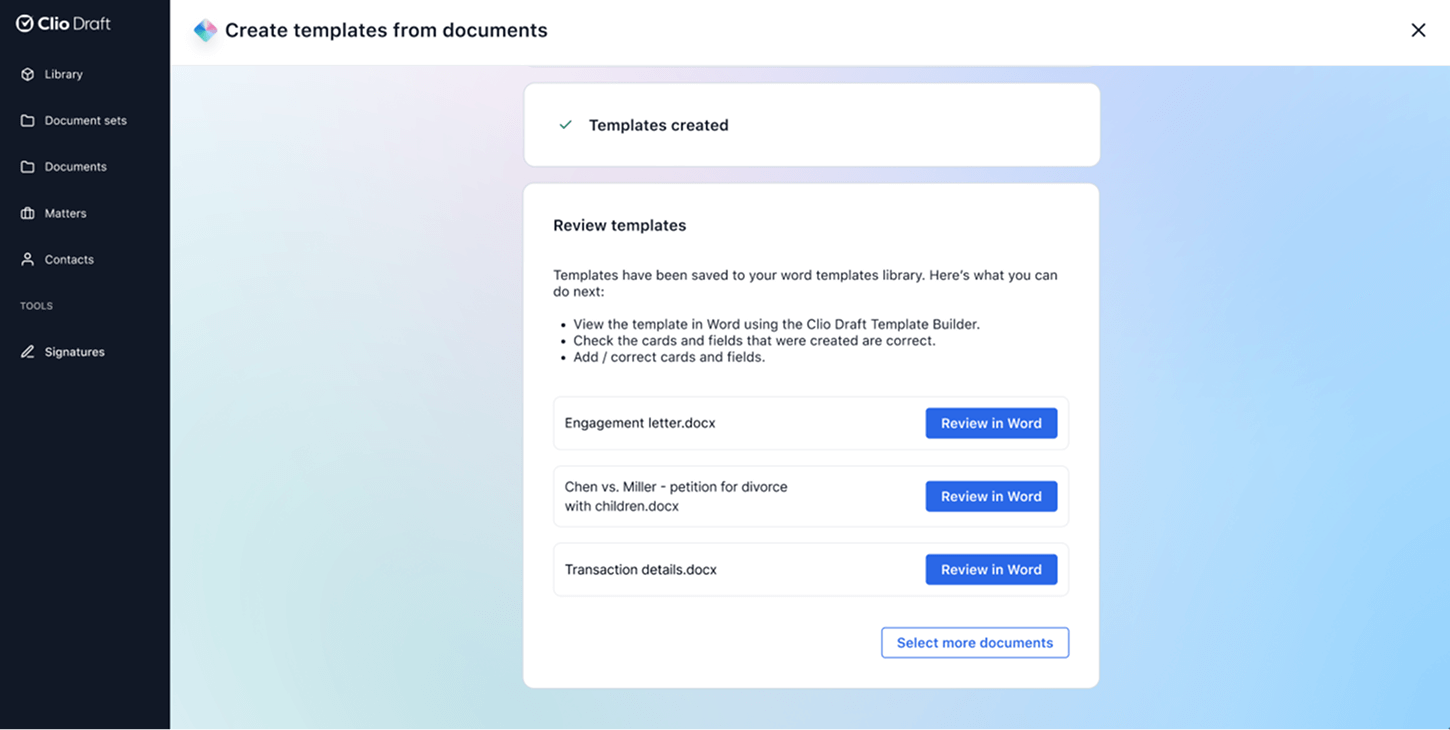
AI-powered template creation in Clio Draft.
AI tools can convert your existing Word documents into reusable templates to enable automated drafting for similar case types. That means the structure, standard clauses, and formatting are already there the next time you need a similar document. This locks in best practices that might otherwise remain undocumented. When new associates join your team, they gain access to your firm’s drafting standards and institutional knowledge from day one.
Client information gathering becomes more efficient too. With tools like Clio Draft, AI collects client information through online questionnaires and automatically populates your templates with their answers. No manual data entry. No transcription errors across multiple documents.
Contract review and risk analysis
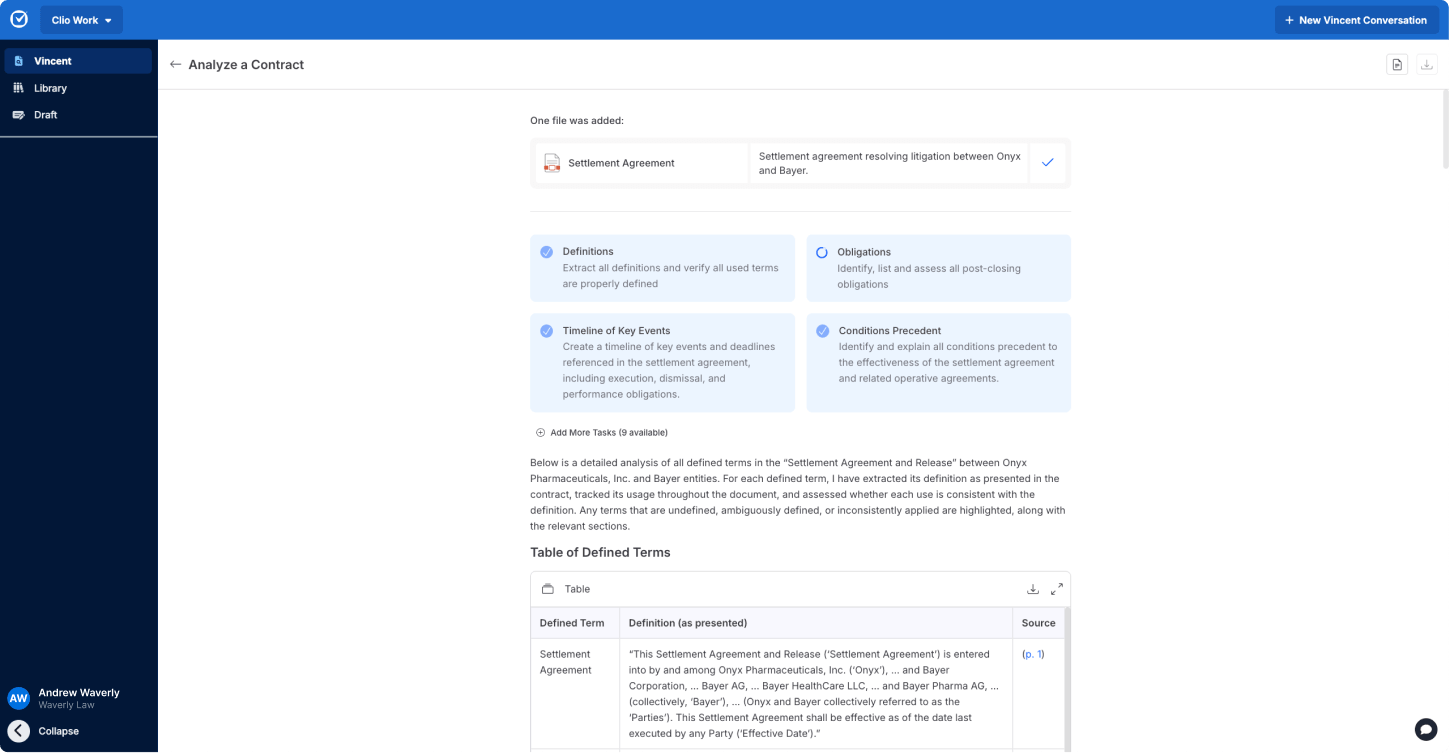
AI-powered contract analysis in Clio Work.
Comparing contract versions manually is tedious and error-prone. It’s easy to miss a critical change buried in pages of revisions. AI-assisted contract review surfaces risks, non-standard clauses, missing terms, and deviations from templates quickly and consistently. This is particularly valuable in commercial transactions, corporate deals, procurement, M&A, real estate, and regulatory reviews.
Redline analysis works in a similar way. AI compares document versions, identifies changes, flags material revisions, and summarizes what’s different, so you can see what changed without manual comparison. When you’re reviewing the third or fourth draft of a complex agreement, AI shows you exactly what changed and why it matters.
By flagging inconsistencies and potential issues, AI improves accuracy and consistency across your team. It doesn’t replace your judgment but ensures you spend time on substantive analysis instead of line-by-line comparison.
Litigation support & case preparation
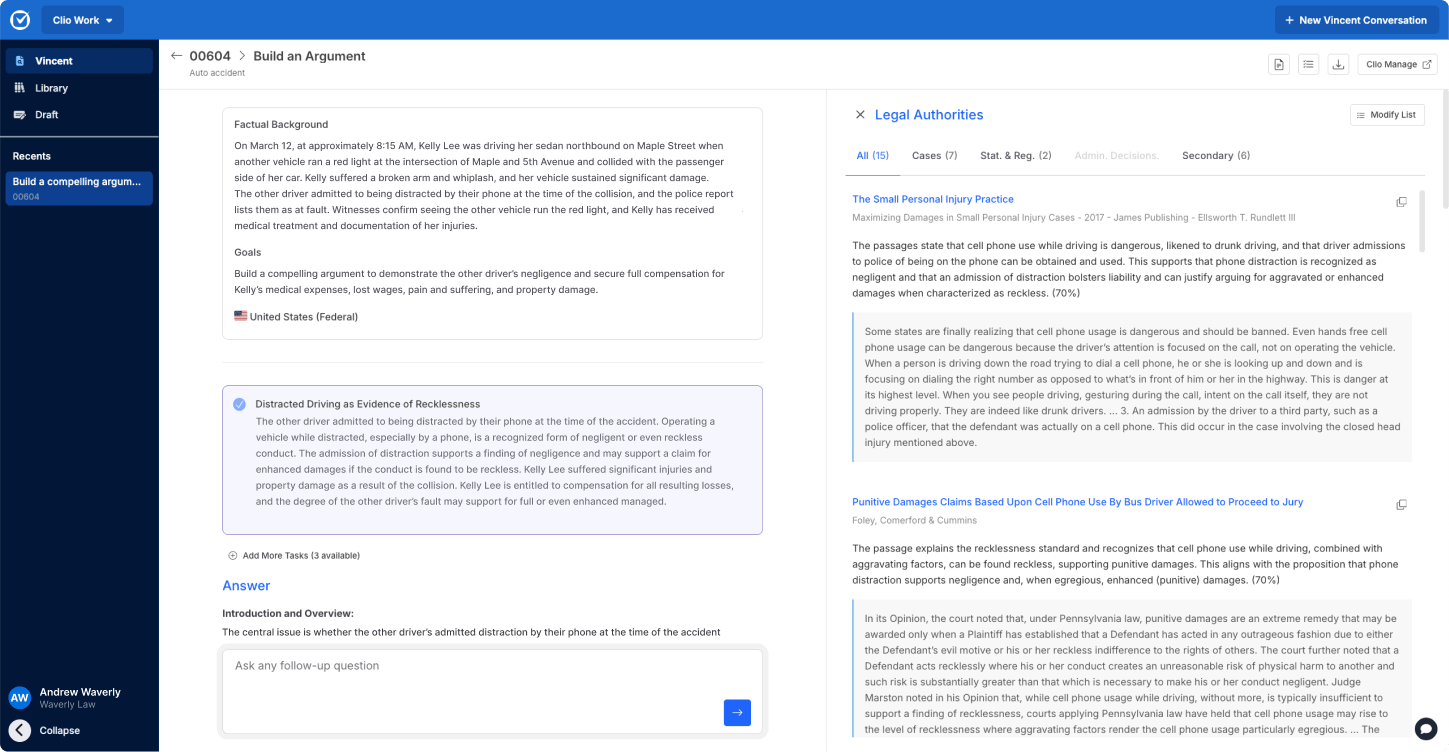
AI-powered case preparation in Clio Work.
AI helps you build stronger arguments by exploring legal propositions and finding sources to support or challenge them. Need to test a theory or find authority for your position? AI searches case law and statutes to show you what supports your argument and what opposes it.
This gives you a clearer picture of your case’s strengths and vulnerabilities before you commit to a strategy. You can evaluate legal theories faster and make better-informed decisions about how to proceed.
Document analysis
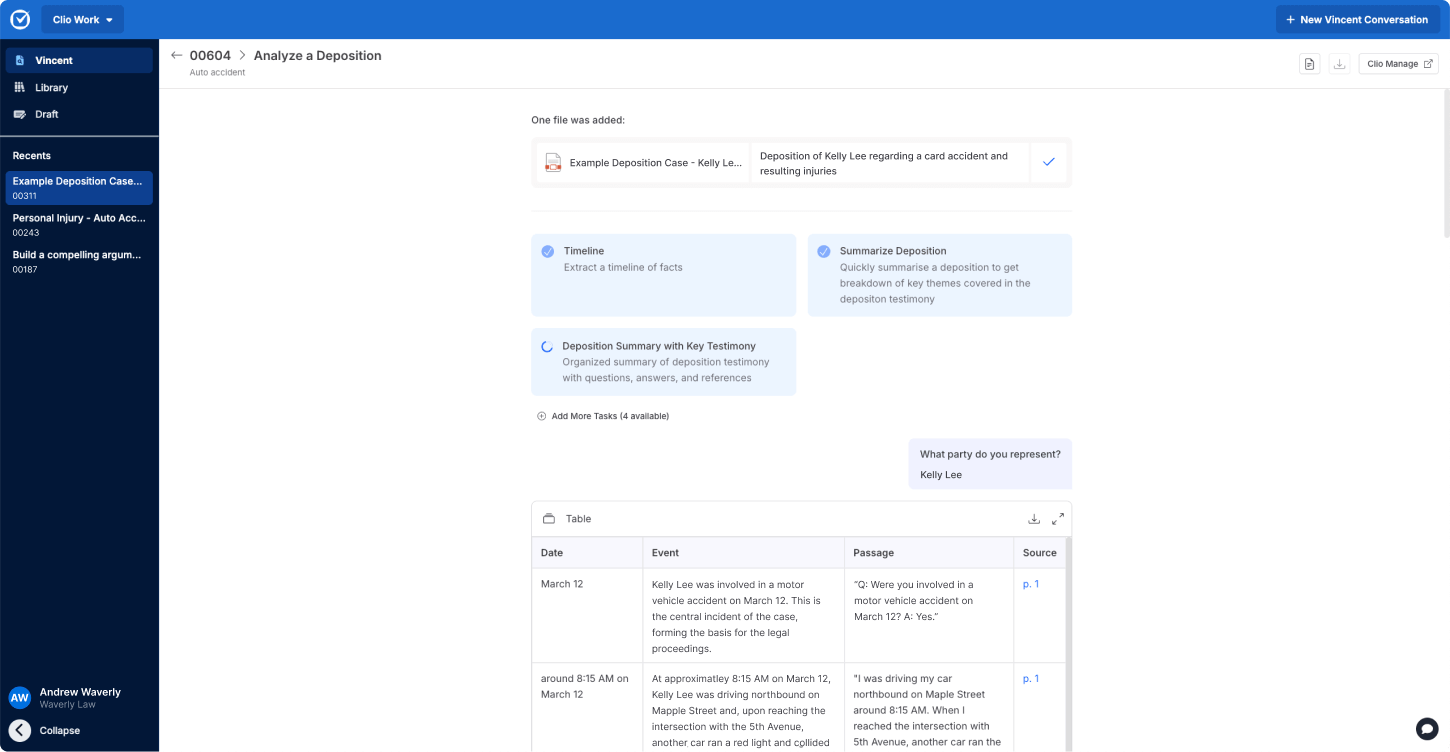
AI-powered document analysis in Clio Work.
Sifting through hundreds of pages of discovery materials, deposition transcripts, and pleadings to extract key dates and information is time-intensive. It’s also where critical details can get overlooked as a result.
AI-assisted document analysis automatically builds chronologies from your case files. Instead of manually constructing timelines from discovery, the system pulls key dates and events into an organized sequence you can verify and refine.
When analyzing pleadings, AI reviews statements of claim and raises possible affirmative defenses with regard to key arguments, weaknesses, and strategic opportunities. It highlights what matters most so you can focus your response where it counts.
In deposition review, the technology extracts key facts, identifies inconsistencies in testimony, and organizes recorded objections for court arguments. This helps you prepare trial exhibits and examination outlines for testifying witnesses more efficiently.
Court calendaring
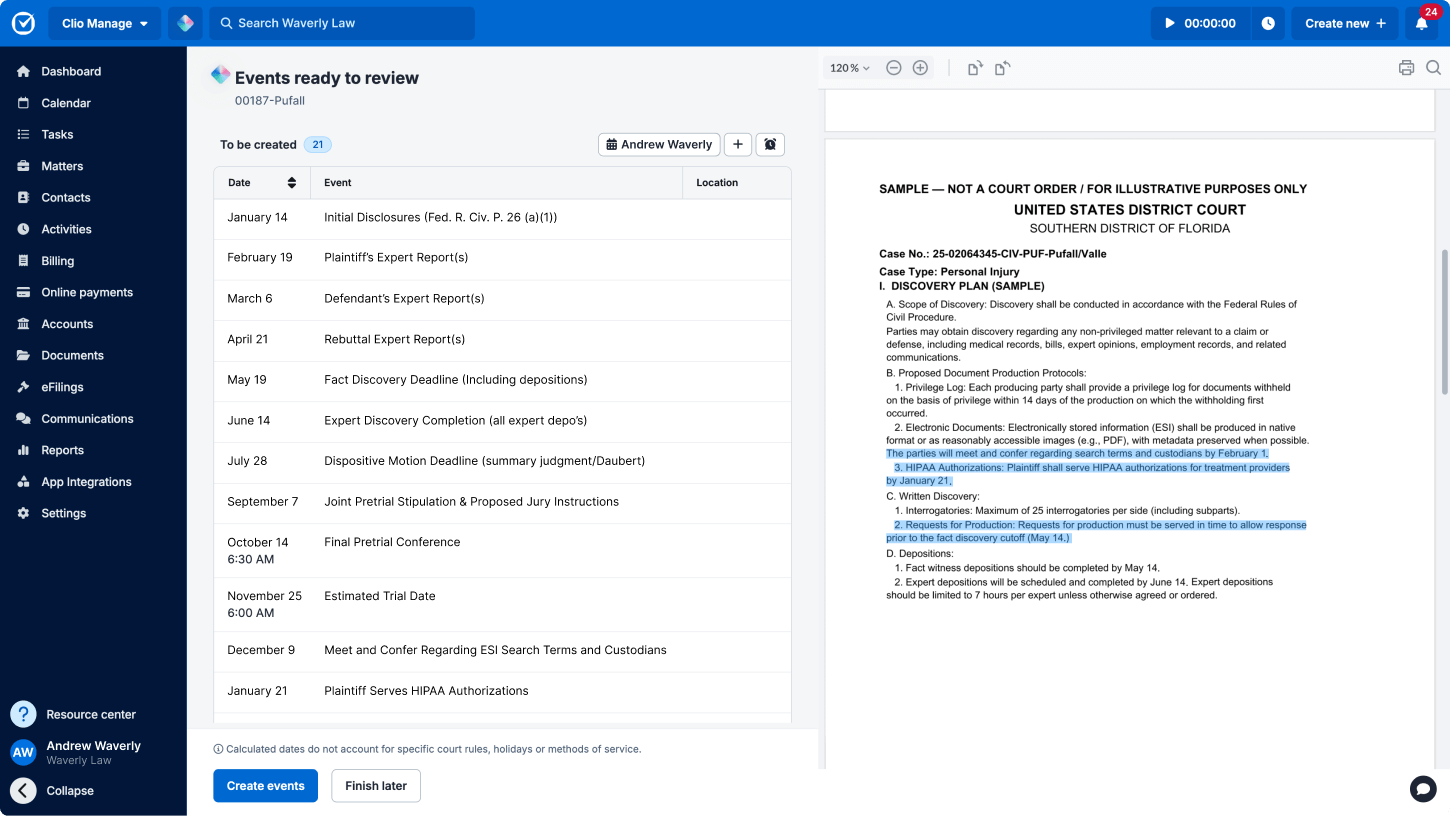
AI-powered deadline extraction in Manage AI.
AI reads court documents, extracts deadlines automatically, and creates suggested calendar events with the source attached for verification. No more manually combing through filings or tracking dates across multiple systems.
You maintain final approval, but the system catches what manual processes might miss, giving you confidence that critical dates are captured and more time for substantive legal work.
“The more we bring in technology and get more efficient, the less stressed I am. It’s because I know nothing will fall through the cracks. I know everybody is getting great service.” — Leah, managing partner at a small law firm dealing in trusts, California
AI in the business of law
In parallel, running a successful law firm requires more than excellent legal work. You need responsive client communication, accurate billing, reliable deadline tracking, and efficient workflows. It’s essential work, but it’s also time-consuming.
AI can automate part of the operational work that slows you down. Think client communications, calendar management, and billing workflows, for example.
Client communications
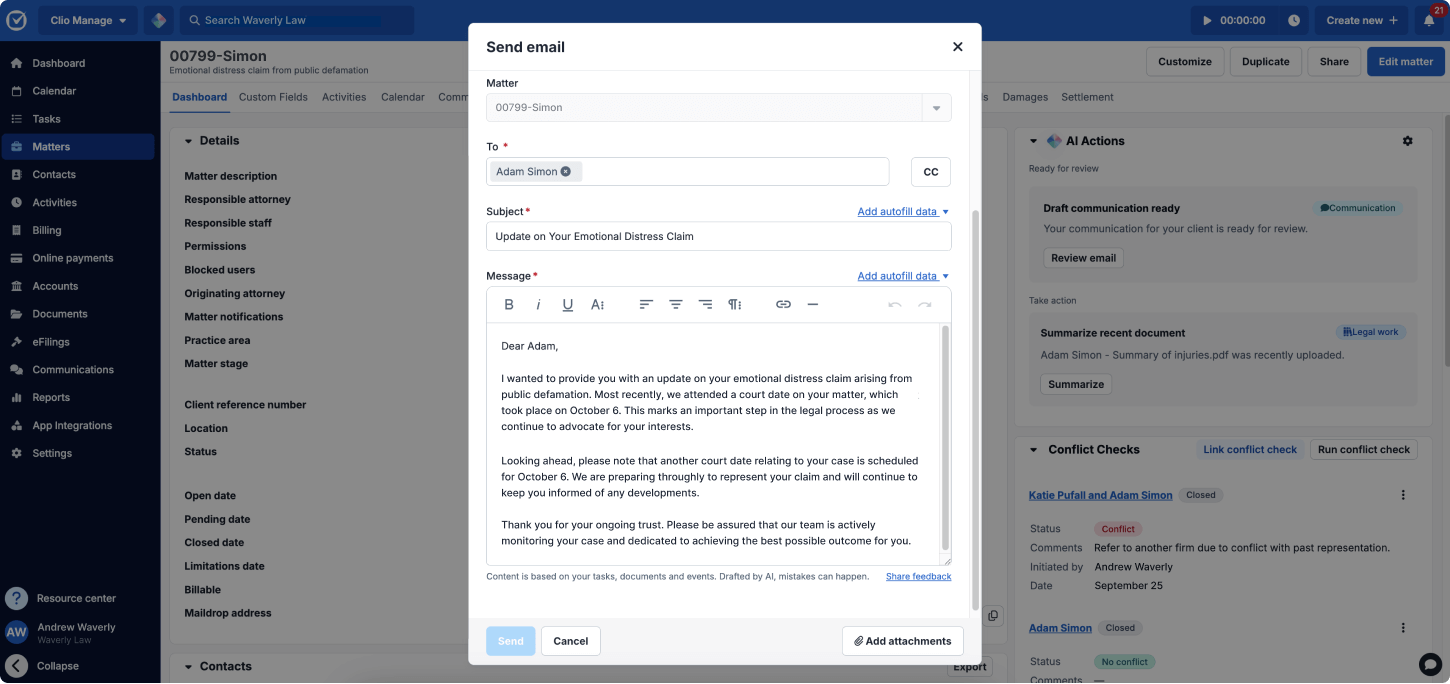
AI-powered client messaging in Manage AI.
One of the most frequent client complaints is lack of communication. AI makes it easier to both notice when communication is missing and speeds up getting the right message sent.
When a task completes, a document uploads, or a hearing is scheduled, AI drafts client emails and updates for your review. You’re not drafting every email manually. You’re reviewing and sending, saving time on each communication that can add up to hours each week.
The time savings compound into something more valuable too: capacity for higher-value client work. When you’re not buried in routine updates, you can focus on strategy sessions, proactive counsel, and the relationship-building that drives client satisfaction and referrals. Clients notice the difference when their lawyer is responsive without being rushed.
Billing workflows
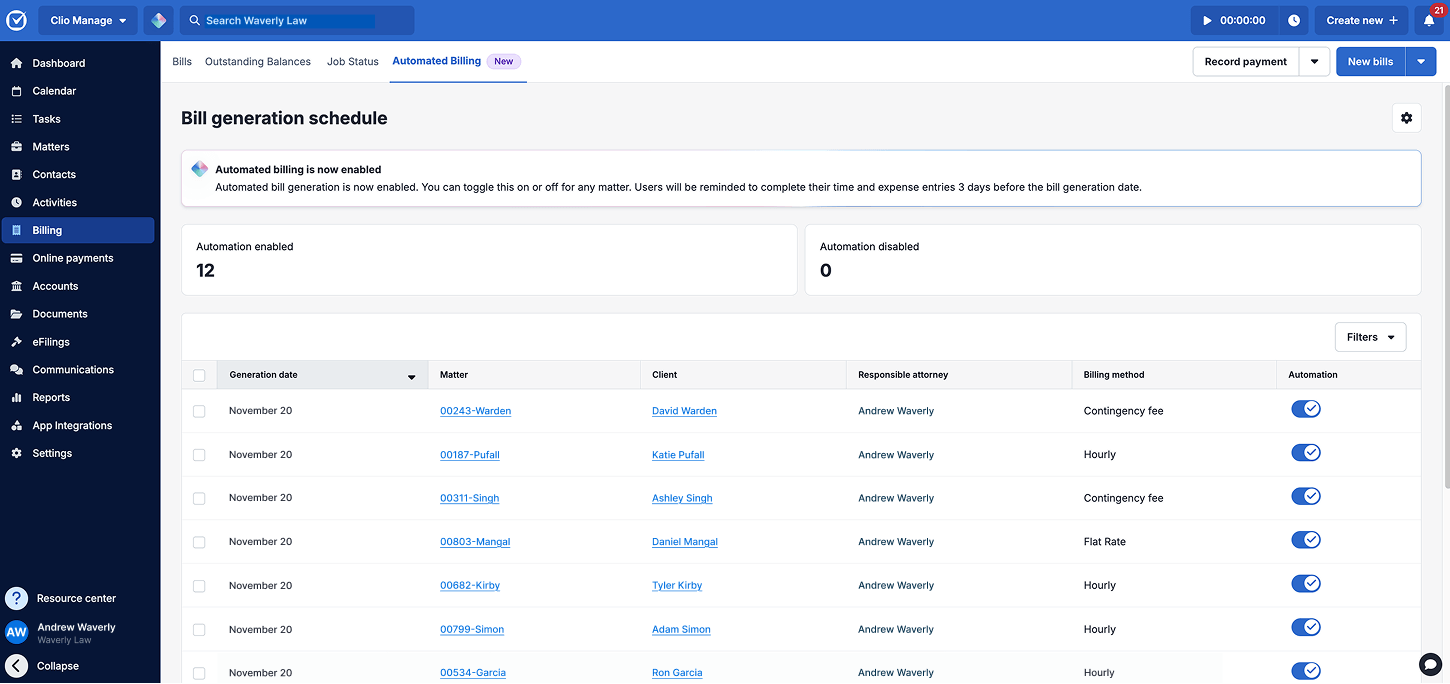
AI-powered billing in Manage AI.
Billing can easily consume hours of your week, but it doesn’t have to. AI transforms invoicing from a manual, time-consuming process into an automated workflow that runs in the background and only prompts you at critical steps for review.
Once you log any remaining time, AI generates draft invoices automatically, pulling expense entries from uploaded receipts and populating time records you’ve already logged. From there, it routes bills to designated approvers with automatic reminders to keep the process moving.
Tools like Manage AI get you back to what matters, serving clients and growing your firm.
Firmwide efficiency & operational improvements

Efficiency gains from AI compound when standardized across your practice.
According to the 2025 Legal Trends Report, firms that have adopted AI report tangible benefits across multiple dimensions:
- 65% report improved work quality
- 63% report improved client responsiveness
- 54% report increased work capacity
- 36% report increased profitability
- 34% report improved client satisfaction
- 29% report increased competitiveness
When standardized firmwide, marginal gains in individual processes multiply into meaningful operational improvements. Many firms track time saved per workflow to measure ROI in legal AI implementation. Whether you’re a solo practitioner or multi-attorney firm, these compounding benefits scale with your practice.
How to adopt AI strategically in 2026
From legal research to drafting to practice management, you see the possibilities. Now comes the practical part: actually implementing it safely at your firm. Successful AI adoption requires understanding where it fits based on your firm size, recognizing common mistakes to avoid, and building an approach that scales with your practice.
Assess your firm’s AI readiness
Before you implement AI, you need to know where your firm actually stands. Are you already using AI in some workflows? Do you have policies in place? Is your team ready to adopt new tools, or will they need training and buy-in first?
Take our two-minute assessment to see how your firm compares to others using AI today, and identify specific areas where you can improve.
Understand how AI benefits law firms by size
AI delivers value across firms of all sizes, with benefits that scale based on your practice and matter mix.
| Firm type | How legal AI helps |
|---|---|
| Solo/Small firms |
|
| Mid-size firms |
|
| Large firms |
|
Avoid common AI mistakes lawyers make
While the growing list of AI use cases for lawyers brings many potential benefits, it doesn’t come without risk, and understanding where AI adoption typically goes wrong helps you avoid these pitfalls.

Relying on general-purpose AI for legal work product
Tools like ChatGPT are powerful, but they weren’t designed for legal work. They can hallucinate citations, misstate law, and create confidentiality risks. General-purpose AI lacks the verification mechanisms and authoritative grounding that legal-specific tools provide.
How to avoid it: Use legal-specific AI like Clio Work that grounds answers in verified sources with links to citations you can independently verify. When you’re researching case law or drafting motions, that difference matters.
Assuming AI outputs are accurate without verification
AI-generated content always requires human review. Whether it’s a contract clause, research memo, or case summary, you remain responsible for accuracy. Skipping verification steps can damage your credibility and create legal risks.
How to avoid it: Build verification workflows into AI-assisted tasks to catch errors before they become problems. Check sources, verify reasoning, and confirm facts. Download our AI-generated content checklist for lawyers to support consistent review.
Copying confidential data into unsecured systems
Client confidentiality isn’t guaranteed with every AI tool. Some platforms can store inputs indefinitely, use them for model training, or lack proper encryption, creating ethical violations and malpractice exposure.
How to avoid it: Before inputting matter information, verify how the tool stores data, whether it uses your inputs for training, and what privacy controls exist. Legal AI tools like Clio Work are built specifically for legal work, with security designed around supporting attorney-client privilege, SOC 2 Type 2 certification, and data handling that keeps your matter information protected.
Skipping firmwide policies or training
Without documented processes, AI adoption becomes inconsistent and risky. Different attorneys using different tools in different ways creates compliance gaps, quality issues, and security vulnerabilities.
How to avoid it: Establish clear policies on which tools to use, what verification steps are required, and when human oversight is mandatory. Train your team on both capabilities and limitations. Use our AI law firm policy template to guide responsible AI adoption.
AI evaluation toolkit: How to choose the right tools for your practice

Not all AI tools built for lawyers offer the same level of reliability. Use these criteria to identify tools that strengthen your practice and avoid unnecessary risk.
Factors to evaluate when choosing AI tools
1. Verify the tool is legal-specific
AI hallucinations, where AI generates plausible-sounding but false information, pose serious risks in legal work. A fabricated case citation or misstatement of law can damage your credibility and expose you to sanctions.
Legal-specific AI is trained on authoritative legal materials and designed for how lawyers actually work. General-purpose AI may be helpful for brainstorming, but it lacks the precision and grounding required for professional legal work.
Ask these questions:
- Is it trained on authoritative legal materials? How often are the materials updated?
- Does it link directly to source materials so I can verify every citation?
- Can I verify that the legal analysis follows from the authorities cited?
- Does it clearly distinguish between primary sources and secondary materials?
- Does it reduce hallucinations compared to general-purpose AI?
2. Check security and data protection standards
You remain responsible for protecting client data regardless of which tools you use. This means conducting thorough due diligence on any AI platform that will handle matter information.
Ask these questions:
- How does the tool use my data (training, storage, retention)?
- Where is data stored, and who can access it?
- Does the tool agree to comply with attorney-client privilege requirements?
- Can I delete data permanently when a matter closes?
- Is data encrypted both in transit and at rest?
- Does the vendor have SOC 2 certification or equivalent security validation?
- Does the vendor use my inputs to train their models?
3. Confirm ethical and regulatory compliance support
Bar associations and courts are rapidly developing guidance on AI use. Your duty of competence now includes understanding the AI tools you deploy, which means that you have to supervise AI outputs the same way you’d supervise a junior attorney’s work.
Ask these questions:
- Does it provide clear documentation of sources and reasoning?
- Does the tool provide supportive usage data if my work is questioned?
- Can I explain how I exercised professional judgement when using this tool?
4. Ensure jurisdiction and practice area coverage
A tool focused on federal law won’t help a family law practitioner who needs state-specific statutes and case law. Verify that any AI tool covers your jurisdictions and practice areas with current, authoritative sources.
Ask these questions:
- Does it cover my specific jurisdictions (federal, state, local)?
- Does it include current, authoritative sources for my practice areas?
- Are secondary sources and practice materials included where relevant?
- Is the legal content updated regularly?
5. Review access controls and permissions
Enterprise-grade tools let you control who accesses what information, ensuring junior associates don’t see partner-level financial data and that confidential matters remain properly separated.
Ask these questions:
- Can I set role-based permissions for different team members?
- Can I restrict access to confidential matters?
- Does it support proper information barriers between matters?
6. Test for matter-aware capabilities
Matter-aware AI produces more accurate outputs because it considers the full picture: not just the question you asked but also the matter it relates to, the client’s situation, and your firm’s standards.
Ask these questions:
- Does it understand specific details of my matters?
- Can it access my documents and matter files?
- Does it consider the full context of my question?
- Can it reference my firm’s standards and preferences?
7. Assess workflow integration
If your AI tool requires lawyers to switch platforms or re-key information, it doesn’t matter how good it is, they likely won’t use it. Implementation succeeds when AI integrates with how your firm actually works.
Ask these questions:
- Does it integrate with my practice management system?
- Can I use it without switching between multiple systems?
- Does it fit into my team’s existing workflows?
Practical evaluation tips
Before committing to any AI tool, request sample outputs or run pilot tests using representative, non-client materials. Evaluate how it performs on work similar to what you handle.
Use this simple scoring rubric to compare tools systematically:
| Criterion | Tool A Score (1-5) | Tool B Score (1-5) |
|---|---|---|
| Verifiability | ||
| Security & data protection | ||
| Jurisdictional applicability | ||
| Workflow fit | ||
| Ease of use |
This structured approach will help you fairly compare vendor presentations so you can make the best choice for your practice.
Move your legal work forward with AI
AI has moved from experimental to essential. Firms of all sizes are using AI to deliver higher-quality work with less friction.
The most valuable AI use cases in law, such as research, drafting, contract review, intake, litigation support, and operational efficiency, are accessible today through purpose-built, legal-specific tools. The key is choosing systems designed for how lawyers work, grounded in verified sources, and built with the safeguards legal practice demands.
With the right tools and verification workflows, AI becomes a reliable partner that accelerates your work, protects your clients, and strengthens your competitive position.
Experience AI built specifically for lawyers
Secure, accurate, and designed for how you work.
Book a demo
Subscribe to the blog
-


Software made for law firms, loved by clients
We're the world's leading provider of cloud-based legal software. With Clio's low-barrier and affordable solutions, lawyers can manage and grow their firms more effectively, more profitably, and with better client experiences. We're redefining how lawyers manage their firms by equipping them with essential tools to run their firms securely from any device, anywhere.
Learn More