

Contents: AI for Law Firms: A Comprehensive Guide
-


10. AI for Litigation: Chronologies, Timelines, and Issue Maps
Finding the signal within the noise of hundreds or thousands of discovery documents is what wins civil litigation cases. That signal is the crucial, admissible evidence that maps to key elements of a case, and it’s the kind of task AI can handle in seconds, while it would take humans many hours or even weeks.
It’s not that attorneys lack the expertise for this task, but rather the sheer volume of discovery information, which is often scattered across deposition transcripts, medical records, and other discovery files, makes document review labor-intensive.
When attorneys pore over hundreds or thousands of pages, there’s the risk that they’ll miss critical facts that are buried in otherwise irrelevant information.
AI is the obvious choice for this kind of sifting and summarization work, and with the right process, attorneys can use it consistently and effectively. Let’s look at the elements of this AI workflow, how to implement it, and how it can transform your litigation work.
The essential elements of an effective AI litigation workflow
An effective AI litigation workflow is a repeatable process in which AI helps transform unstructured materials into structured artifacts (timelines, issue maps, summaries) that your team can trust and reuse. Lawyers establish the workflow with initial prompts and review the AI’s output against the source materials.
AI serves to enhance legal work but doesn’t replace lawyers. It handles the review and summarization of many disparate files, while attorneys validate the output and decide on strategy and next steps for client representation and advocacy.
The foundational AI litigation workflow: Chronology → timeline → issue map
One of the best ways to implement AI in document-heavy litigation is to establish a foundational AI litigation workflow, which generates three distinct but related outputs:
- Case chronology: a structured list of events and facts with sources.
- Case timeline: a simplified, sequential view of the chronology aligned to legal themes or stages of the case.

- Case issue map: an organized presentation of how the facts map to different aspects of the case. For example, the issue map would show which facts connect to legal elements, claims and defenses, and evidentiary support.
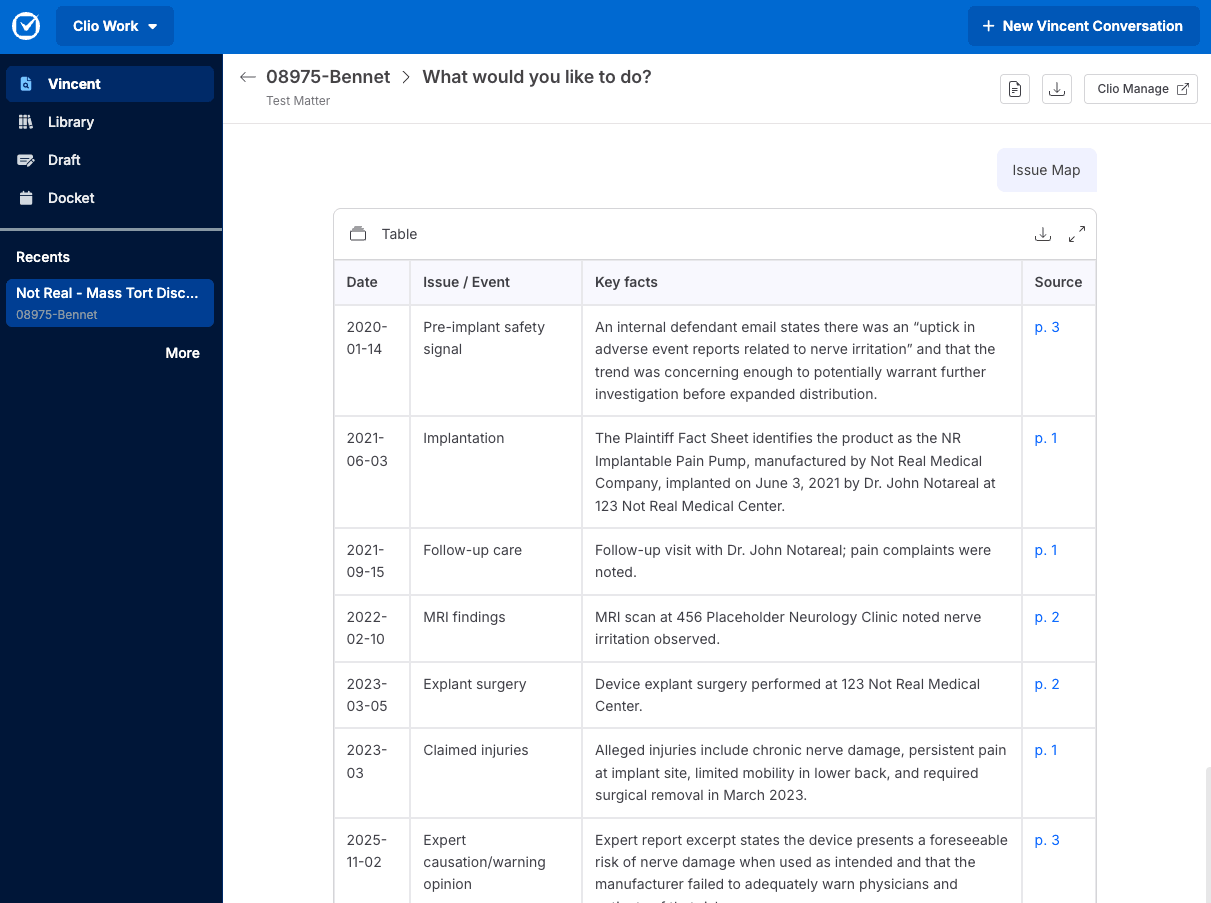
With this foundational workflow’s outputs, lawyers can quickly surface the key aspects and elements of the case at a glance.
The role AI plays in this litigation workflow
AI supports each step of this workflow. For all the outputs, you would first upload a variety of inputs into the AI, including all the discovery files (emails, deposition transcripts, answers to interrogatories, etc.) and any pleadings and other court filings.
You then type a prompt into the AI asking it to create a chronology of events from this mixture of sources.
To generate the matter timeline, you enter a separate prompt requesting that the chronology be organized around key phases. For example, in a personal injury matter, those phases might be:
- The incident that caused the injury.
- The treatment of the injury.
- The demands sent to the party who is liable for the injury.
- The negotiations so far between the injured party and the at-fault party.
To create the issue map, you enter a prompt asking for the facts to be connected to the elements of the case. In the personal injury matter example, the prompt might say, “Please connect relevant facts to the elements of the case and these related issues, specifically:
- The defendant’s duty.
- The breach of the duty.
- Causation.
- Damages.
- Witness credibility.
- Notice of the claim(s).”
Once the AI has all of the inputs, you can generate several related outputs, tailoring them to your needs by adjusting how you phrase the prompts.
You can also go beyond these initial three outputs by asking for additional insights. For example, you might ask the AI to analyze and list what information you still need to effectively pursue the case. It would then identify any documents you might be missing, questions that need to be answered, and other issues that are unclear, such as the dates on which particular events occurred.

AI can generate analyses in seconds that might take an associate attorney many minutes or hours to create.
How to implement this workflow without creating risk
When you first set up this litigation AI workflow, you’ll want to standardize it. Variability in how it is implemented could affect the consistency and quality of the outputs. To standardize the workflow, you should create a standard operating procedure (SOP) that checks these boxes:
☐ Defines approved systems and inputs. Specify which secure AI tools can be used, where data should live, how files are named, and what metadata must be included.
☐ Creates guardrails for general-purpose AI tools. If you’re not yet using legal-specific tools, clearly limit what information can be entered and keep sensitive client data within secure, approved systems.
☐ Provides templated prompts that users must follow. These prompts should ask the AI to provide sources (including the exact paragraph or line when possible).
☐ Spells out how attorney users should review and validate the AI output and its sources.
☐ Establishes the version of the workflow, identifies who has version control, and requires that new versions of the SOP/workflow are labeled as such.
Standardizing the workflow in this way should also be one part of a larger, systematic process of introducing AI into your law firm’s workflows.
Document-heavy litigation: how litigation teams can use AI
An AI litigation workflow can significantly improve efficiency in document-heavy litigation, such as matters involving torts (including medical malpractice), contracts, and other civil and commercial disputes.
The best way to implement AI in document-heavy litigation is to create chronologies, timelines, and issue maps. This flags weaknesses in cases and identifies additional potential causes of action.
In tort cases, AI can quickly sort through voluminous medical records and other discovery information to create treatment chronologies, damages documentation, and highlight any inconsistencies that require attention.
In civil and commercial matters, legal AI platforms for civil litigation workflows can review contracts, change orders, correspondence, and extensive financial records, identifying needed elements and additional potential causes of action.
Using AI in these litigation practice areas helps lawyers move through large volumes of information faster by synthesizing key details, surfacing relevant facts, and building clear timelines.
The AI in effect acts like a paralegal or assistant, summarizing and organizing information according to a senior attorney’s direction. Whether you’re a partner, solo attorney, legal administrator, or associate, an AI litigation workflow is one of the most effective ways to use AI in law.
Advanced use cases for AI in litigation

Once you’ve mastered the foundational AI litigation workflow, you can expand into more advanced AI use cases for litigation support. Here are some additional applications worth exploring:
- Detecting inconsistencies in statements across different transcripts.
- Ensuring exhibits accurately reflect their sources.
- Creating witness packets that capture all the relevant information witnesses need to prepare for depositions and trial testimony.
- Assembling mediation briefs, negotiation position summaries, and other materials to prepare for dispute resolution.
- Tagging patterns across defined subsets of discovery (such as particular themes that emerge from a subset of document custodians).
You can also use AI-powered predictive analytics to inform your litigation strategy, assessing the likelihood of success for a motion, estimating legal costs, and weighing whether to settle.
AI tailored to personal injury and tort litigation
As you evaluate potential AI tools for litigation, you should seek out AI solutions tailored to personal injury and tort litigation. You want AI that can review discovery files in these practice areas and all others, and highlight what’s relevant, summarize what’s important, and connect each finding to applicable law for faster insights.
Clio Work can review voluminous discovery files and parse technical medical language. It also understands how medical facts relate to the elements of tort cases in your selected jurisdiction. It can then serve as a sounding board when you’re evaluating how strong your case is and what kind of settlement you can obtain.
Why AI litigation workflows work best with a platform approach
The most secure way to implement AI litigation workflows is on a legal-specific platform that has AI (as opposed to generic AI tools such as ChatGPT). Legal-specific AI is more secure because you can set permissions for who in your firm can access information from a particular matter. In addition, any information you enter into the AI won’t be shared with third parties or used for training purposes.
A legal-specific AI, like Clio Work, is more efficient to work with because it’s already connected to all the matter context, such as discovery materials, client communications, pending tasks, and billing stored in Clio Manage. You don’t need to re-upload this contextual information in the chat, or move between different platforms, the AI will automatically rely upon it to fulfill your requests.
In contrast, if you’re using a standalone AI tool, it likely suffers from these shortcomings:
- It’s not secure; that is, it may use information you enter for training the model, or it may expose that information to other firm members who have the same use license as you.
- You have to enter matter information each time you want the AI to analyze it.
- It’s a tool you have to switch to, rather than staying in one matter management platform where you can accomplish all your matter-related work.
Using AI in litigation vs. completely manual processes
Does using AI for litigation work actually save time when you still have to review its output? Wouldn’t it take less time and be more effective just to have humans carry out the process from the beginning?
There’s compelling evidence that, when it comes to both speed and accuracy, AI beats out humans. A recent Stanford study found that AI-generated summaries of medical records were judged as good or better than human-created ones in most cases by a panel of 10 physicians. While the study focused on the medical field, the underlying task, reviewing and summarizing large volumes of complex documents accurately, maps closely to what litigation attorneys face in discovery.
What about the risk of the AI hallucinating incorrect information? The study found that, while even the best AI did introduce some inaccurate information, it did so less frequently than the human summarizers.
AI reads and summarizes information exponentially faster than humans. As a result, even with attorney review, an AI-powered process is significantly more efficient than one handled solely by humans.
By relying on AI for summarizing and organizing relevant information in document-heavy litigation, lawyers can more quickly develop their theory of the case, assess the best path to resolution, and convince the other side to settle. Put simply, AI helps your clients reach a satisfactory resolution sooner and enables you to get paid faster.
Learn more about the value of a single platform approach to AI for litigation workflows, and discover the kinds of results it can deliver for you.
Book a Clio demo