


As a lawyer, you probably know how to number a tabulated list. What you might not know, however, is how to get Word to maintain that numbering once a document enters revision.
You insert a new clause at section 3.2 and every subsequent number shifts, except the ones that don’t. You accept a round of tracked changes and discover that your numbering has suddenly restarted at 1 in the middle of your argument. You paste a set of representations from last year’s deal into a new agreement, and the pasted clauses bring their own numbering system with them.
Now your document contains two parallel list definitions that look identical on screen but behave completely differently.
Numbering rules are simple, at least in theory. The acceptable format for numbering a tabulated list in legal writing is well established. The difficulty is that Word manages numbering through a structural system that’s easy to break during revision and hard to diagnose once it’s broken.
This guide covers the acceptable formats for numbering a tabulated list in legal writing, how those lists function structurally in Word, why numbering breaks during revisions, how to fix and prevent list corruption, and when manual numbering stops scaling in law firms.
One accepted round of changes can restart your numbering at 1 in the middle of the argument. Explore how Clio Draft helps keep list structure intact as the document changes.
What is a tabulated list in legal writing?
A tabulated list in legal writing is a vertically structured, numbered or lettered list used to present legal elements with clarity and hierarchy. You see them constantly in legal work because legal documents are full of information that needs to be separated, sequenced, and individually addressed.
Common examples include:
- Factors in a motion to dismiss.
- Elements of a cause of action.
- Contract representations and warranties.
- Findings of fact.
The important thing to understand is that a tabulated list establishes legal hierarchy. The relationship between Section 3, subsection (a), and sub-paragraph (i) goes beyond visual indentation alone. It defines how those provisions relate to each other, which ones are subordinate, and how they should be read together.
So when that hierarchy breaks, the document’s logic breaks with it.
The acceptable format for numbering a tabulated list in legal writing

The acceptable format for numbering a tabulated list in legal writing is straightforward, though local rules often impose specific formatting constraints, so always check those first.
Arabic numerals (1., 2., 3.) typically govern top-level items. Lowercase letters (a., b., c.) or parenthetical letters ((a), (b), (c)) handle the first sublevel. Roman numerals (i., ii., iii.) sit beneath those. The standard multilevel hierarchy runs 1. → (a) → (i), though variations exist across jurisdictions and document types.
What matters more than which specific format you choose is that the format follows a logical progression, maintains parallel structure, uses consistent indentation at each level, and never mixes numbering systems within the same tier. A list that jumps from (a) to (ii) to 3. creates confusion for anyone reading the document. In a contract, this can introduce genuine ambiguity about which provisions sit at which level.
That’s why consistent formatting matters so much: it’s doing structural work.
Numbering a tabulated list in Word vs. numbering it on paper
This is where most problems with numbering a tabulated list in legal writing originate, and it catches lawyers out at every level of experience.
On paper, numbering is visual. You write “(a)” in front of a paragraph, indent it, and it’s a sublevel. The hierarchy exists because you can see it. When you learned to number tabulated lists in law school or early practice, this is probably how you learned. You typed the number, set the indent, and moved on.
However, Word doesn’t work this way. When you type “1.” and press tab, Word sees text. It doesn’t see a numbered item in a hierarchy. As far as the software is concerned, you’ve written a paragraph that happens to start with the characters “1.” followed by a tab space. It has no structural relationship to the paragraph above it or below it. It won’t adjust if you insert a new item or renumber if you delete one.
Structural numbering in Word is governed by three things working together: multilevel list definitions, paragraph styles, and outline levels. The list definition sets the numbering sequence and format at each level. The paragraph style controls indentation and appearance. The outline level tells Word where a paragraph sits in the hierarchy.
When all three are aligned, Word understands the structure. It knows what level each item belongs to, and it renumbers downstream automatically when you insert or remove a clause. When any one of the three is missing or inconsistent, that understanding breaks. A paragraph that looks like a level-two item but carries the wrong outline level won’t behave like one during edits. This is why manually typed numbering fails under revision: it produces the right appearance without establishing any of this structure underneath.
If numbering isn’t connected to a multilevel list definition, it can’t adjust reliably during edits, redlines, or clause insertions.
Manual numbering vs. style-linked numbering in Word
Manual and style-linked numbering are two very different approaches, and you’ll soon see the differences the moment someone starts editing a document.
Manual numbering means you’ve typed the numbers yourself, set indentation by hand, and created sublevels visually. Each paragraph stands alone. It looks correct, and it will stay correct exactly as long as nobody inserts, deletes, or moves anything.
But the moment a new clause goes in at section 4.1, you need to manually renumber 4.2, 4.3, 4.4, and every cross-reference that points to any of them. In a 30-page contract with nested subclauses, that could be an hour of work, with no guarantee you catch all the errors. Conditional logic compounds the manual numbering problem further: clauses that only apply if a certain condition is met are often added, removed, or reordered late in negotiation, which means you’re renumbering again exactly when you’re under the most time pressure.
Style-linked numbering, on the other hand, means the numbers are generated by a defined multilevel list. Each level is tied to a paragraph style, with indentation governed by the style definition rather than manual tabs.
When you insert a new clause, the numbering adjusts. When you accept a tracked deletion, the sequence recalculates. Sublevels stay aligned because the relationship between levels is defined in the list structure, not in the visual spacing of individual paragraphs.
Imagine you’re drafting a contract and have created a set of representations and warranties numbered Section 3.1 through 3.12, with subclauses at each level. With manual numbering, inserting a new representation at 3.4 means hand-renumbering eight subsequent sections and every internal cross-reference. With style-linked numbering, you insert the new paragraph, apply the correct style, and the hierarchy updates itself. Style-linked numbering also builds your table of contents automatically—every time you add, remove, or renumber a section, the TOC updates with it, with no manual reconciliation required.
If your tabulated list needs to survive revision, collaboration, and a filing deadline, then it should be built from a style-linked system rather than a manual one.
How tabulated lists behave inside real legal documents

Tabulated lists serve different purposes depending on the type of document you’re creating, and each context requires having disciplined hierarchy control.
Lists inside contracts
In contracts, nested clause numbering like Section 3.2(a)(i) creates layered obligations. The hierarchy defines which provisions are subordinate to which, how defined terms scope to specific subsections, and what a cross-reference to “Section 3.2(a)” actually encompasses.
That means when numbering shifts during redlining, the legal meaning of those relationships can shift with it.
Lists inside briefs
In briefs, tabulated lists organize the analytical framework. For example, these might include a three-factor test for preliminary injunctive relief, the elements of a negligence claim, or the prongs of a statutory standard. Each numbered item carries substantive weight, and courts expect the numbering to be consistent throughout the document.
Lists inside pleadings
Numbered allegations are the structural backbone of pleadings. The opposing party responds paragraph by paragraph, and discovery references specific allegations by number. If paragraph 14(c) shifts to 14(b) during a revision, every downstream reference in the case becomes unreliable.
Lists that contain defined terms and cross-references
Across all of these contexts, tabulated lists frequently contain defined terms and internal cross-references. A defined term introduced in subsection (a) gets referenced in subsections (b) and (c). A brief cites “Section II.B.2” in its conclusion. A motion references “Paragraph 14(c)” multiple times across different sections.
That creates a web of dependencies across the document. When numbering changes, these references break. Not always visibly, and not always immediately. Sometimes the misalignment surfaces when opposing counsel files a response referencing paragraph numbers that no longer match your document.
Why tabulated lists break during revisions
Numbering corruption follows a few predictable patterns, and understanding them helps you spot any damage before it reaches a filing.
- Inserting a new clause mid-sequence: In a manually numbered document, every downstream number needs manual correction. In a style-linked document, renumbering should happen automatically, but only if the new paragraph is correctly linked to the same multilevel list definition. If you drop in a paragraph with the wrong style applied, it will either sit outside the numbering system entirely or start a new sequence at 1.
- Accepting tracked deletions: When you accept tracked changes, Word reconstructs the numbering sequence and sometimes relinks paragraphs to a different list definition than the one they started in. The numbering may look continuous on screen but be structurally fragmented underneath.
- Pasting language from another document: When you copy clauses from a prior agreement, those clauses carry their own multilevel list definitions. Word imports them as additional definitions in the new document, creating two or more parallel numbering systems. They may produce identical-looking output, but they operate independently, and the numbering diverges the moment someone inserts a clause.
- Reusing templates from prior matters: A template that’s been copied and modified across dozens of matters accumulates legacy numbering definitions over time. Each layer is invisible in normal use but can behave unpredictably when you start editing.
How to fix corrupted numbering safely
When numbering breaks, your instinct is probably to start retyping numbers by hand. This is the quick and easy approach that makes the document look correct. However, it guarantees the problem will return the next time anyone edits it.
Fixing numbering properly requires restoring structural control, not just adjusting what’s visible on screen. A reliable repair sequence works from the inside out:
- Turn on formatting marks (¶) to see the actual paragraph structure. This exposes where manual line breaks, stray tabs, and disconnected paragraphs are hiding.

- Remove manually typed numbers and any direct indentation. This strips the cosmetic layer so you can see what Word’s list system is actually doing.
- Reapply a clean, style-linked multilevel list definition to the affected paragraphs. This reconnects the numbering to a single structural system.
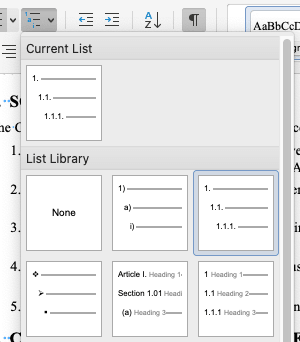
- Confirm that each paragraph’s style matches its intended outline level. A paragraph styled as Body Text won’t participate in a Heading-linked numbering scheme, even if it visually looks like a numbered heading.
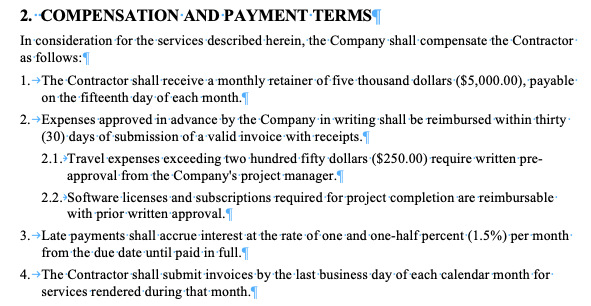
- Update all fields, including the table of contents and any cross-reference fields. These won’t reflect the corrected numbering until they’re refreshed.
Structural repair comes first. Cosmetic adjustment comes after.
Restarting numbering without creating a new list definition
Restarting a numbered sequence, (for example, starting the subsection numbering over at (a) under a new main section) must happen within the existing multilevel list system. The temptation is to right-click, select “Restart at 1,” and move on. This sometimes works correctly, but other times, it creates a hidden parallel list definition that shadows the original.
The safer approach is to restart numbering within the current list definition, confirm the paragraph remains linked to the intended style, and verify outline levels after the restart. A new multilevel list definition is only appropriate if you’re rebuilding the document’s numbering from scratch. In any other situation, working within the existing definition is the right move.
If the restart produces a new list definition (visible in the List Styles gallery as a separate entry), you’ve introduced a structural split that will cause problems during later edits. Delete it, undo the restart, and try again within the original definition. Restarting numbering should adjust the sequence rather than generating a second numbering structure beneath the document.
Master Microsoft Word for Legal Drafting
This is just one piece of the puzzle. Explore the Master Microsoft Word for legal drafting hub for all our Word resources for legal professionals.
MS Word Hub
Preventing numbering drift during legal collaboration
Numbering stability is much easier to maintain than to repair. A few practices, applied before drafting begins, prevent most of the problems described above.
Lock list definitions before the first draft circulates
Establish an approved multilevel numbering template and ensure every drafter starts from it. When every contributor works within the same list definition, their edits participate in the same numbering system. When each person applies their own preferred numbering setup, you get parallel definitions that diverge under revision. For a deeper look at building and managing Word styles, see our webinar on Microsoft Word Styles.
Tools like Clio Draft centralize this by letting you build a single approved template structure that carries forward automatically into all generated documents across future matters. That way, the numbering is correct by default, without relying on each drafter to set it up correctly. Avoid manual indentation
If you’re pressing tab to create a sublevel instead of applying a style that carries the correct indentation, you’re building visual numbering that will break during edits. Every indentation decision should be made through the paragraph style, not through keystrokes.
Normalize pasted content immediately
When you paste clauses from another document, convert them to destination formatting before doing anything else. This strips the imported list definitions and forces the pasted text to adopt the current document’s numbering system. It takes seconds and prevents the most common source of parallel list corruption.
Standardize Word settings across contributors
Different author configurations can generate parallel styles with identical names. The result is two paragraphs that both display “Heading 2” in the style gallery but behave differently in the numbering hierarchy. Agreeing on standard Word settings before collaboration begins removes this risk.
Set the foundation before review begins
By the time a document enters its first review cycle, the structural foundation should already be set. Retrofitting the numbering discipline after collaboration has started is possible, but it’s slower and less reliable than getting it right from the beginning.
When manual list management stops scaling in law firms
Everything described in this guide works for a single drafter managing a single document. It can also work, just about, for a small team collaborating on a handful of matters with disciplined Word practices.
However, it stops working when the volume exceeds what individual vigilance can sustain. A firm drafting dozens of commercial agreements per quarter, with clauses reused across matters and templates maintained by different practice groups, will run into numbering corruption regularly.
Every instance means someone has to diagnose the problem and repair the structure before checking the result. That’s a time-consuming and non-billable distraction for busy legal teams.
At this point, it’s worth considering alternatives that will automatically ensure correct numbering by default throughout all your legal documents.
Moving beyond manual list management
At firm scale, numbering integrity can’t depend on individual drafters remembering to check it. Clio Draft was built to enforce this by design.
It provides centralized templates, consistent hierarchy systems, and structured numbering logic that doesn’t depend on each individual drafter maintaining discipline independently.
With Clio Draft, you can generate documents that automatically enforce multilevel hierarchy and clause sequencing rather than repairing them before every filing. The numbering holds because the system produces it correctly, not because anyone caught it in time.
Ready to see what sort of impact that would have on your firm? Sign up for a Clio Draft demo today.
Tabulated List in Legal Writing FAQs
What is a tabulated list in legal writing?
A tabulated list is a structured, vertically aligned list used to present legal elements with clarity and hierarchy. Common examples include enumerated factors in a motion, elements of a cause of action, contract representations and warranties, and numbered allegations in a pleading. The numbering establishes relationships between provisions, not just visual order.
What is the acceptable format for numbering a tabulated list?
Standard formats include Arabic numerals (1., 2., 3.) for top-level items, lowercase or parenthetical letters ((a), (b), (c)) for the first sublevel, and Roman numerals (i., ii., iii.) for the level below. The key requirement is consistency: logical progression, parallel structure, uniform indentation, and no mixing of numbering systems within the same level.
Why does my numbered list restart unexpectedly in Word?
This typically happens when a paragraph becomes disconnected from the document’s multilevel list definition. Pasting content from another document, applying a different style, or accepting tracked changes can all sever the link between a paragraph and its numbering system. The fix requires reconnecting the paragraph to the correct list definition, not retyping the number.
Should I manually type numbers in a legal brief?
Only if the document will never be edited and never needs a table of contents, which in practice means never. Manually typed numbers create the appearance of structure without the underlying system to support it. Any insertion, deletion, or reorganization requires hand-renumbering every affected paragraph and cross-reference. Style-linked numbering handles these adjustments automatically. For reliable numbering a tabulated list in legal writing, style-linked numbering is the better approach.
How do I create multilevel numbering for contracts in Word?
Define a multilevel list and link each level to a paragraph style (Heading 1, Heading 2, Body Text Level 1, etc.). This connects the numbering to Word’s style system so that hierarchy, indentation, and sequencing are governed structurally. The critical step is linking levels to styles rather than creating an unlinked list, which behaves like manual numbering with automatic incrementing.
Why does my table of contents reflect incorrect numbering?
The TOC generates from paragraph styles and outline levels, not from what you see on screen. If paragraphs have been manually formatted to look like headings without being assigned heading styles, the TOC won’t include them. If heading styles have been reassigned or outline levels have drifted during edits, the TOC will reflect the structural state of the document rather than its visual appearance. Update the TOC after confirming that all styles and outline levels are correct.
How do I fix numbering after accepting tracked changes?
Accepting tracked changes can disrupt multilevel list definitions. After accepting changes, reveal formatting marks, confirm that all numbered paragraphs are linked to the same list definition, reapply the correct multilevel list if needed, and update all fields. Resist the urge to retype numbers manually, as this converts structural numbering to visual numbering and guarantees the problem will recur.
When should I rebuild numbering instead of fixing it?
When the document contains multiple competing list definitions that produce unpredictable behavior during edits. If restarting numbering creates new list definitions, if pasted content has introduced parallel systems, or if repairs to one section destabilize another, a clean rebuild is more efficient. Strip all numbering, reapply a single multilevel list definition linked to correct styles, and renumber from scratch.
Master Microsoft Word for Legal Drafting
This is just one piece of the puzzle. Explore the Master Microsoft Word for legal drafting hub for all our Word resources for legal professionals.
MS Word Hub