

Tables of contents (TOC) are crucial in legal documents. They provide clarity and help all parties navigate sections and terms efficiently. When structured and formatted correctly, a table of contents saves significant time and resources, whether dealing with appellate briefs with Romanette style front matter, motions with multiple section breaks, contracts with nested clauses, or pleadings reused across legal matters.
But maintaining that structure in Microsoft Word is harder than it sounds.
Pages may suddenly shift, or the entire TOC might break before filing or after redline acceptance. Headings may appear but not register properly. Updating the table or provisions in the document may inadvertently alter the formatting to the point that section breaks feel too risky to touch during editing.
In this guide, we’ll explore:
- What tables of contents actually depend on in legal Word documents.
- Why they frequently fail during drafting workflows.
- How to diagnose and fix structural corruption safely.
- How to keep formatting stable through collaboration.
We’ll also explain what legal professionals can do when manual TOC repair and management processes stop scaling in the firm.
Still rebuilding your table of contents every time a document changes? Explore how Clio Draft helps you generate documents from templates with the structure already built in.
Why tables of contents break in legal documents
Tables of contents in legal documents break frequently due to several issues that arise when drafting and editing in Word, including:
- Heading styles being overridden after edits.
- Multilevel numbering resets.
- Section breaks and pagination shifts.
- Hidden formatting changes introduced during typing or carried over from pasted content.
These structural failures require structured solutions. Addressing them effectively means implementing clear protocols around diagnosing and safely fixing common TOC errors.
Diagnosing a broken table of contents in legal documents
Diagnosing issues with a legal document’s table of contents should be viewed as an ongoing process, as structural breaks are easier to fix when identified early.
Once the TOC structure has been established, each edit should immediately be followed by running through a diagnostic checklist:
- Have you updated the TOC field to reflect the latest changes?
- Are the page numbers displayed correctly?
- Are all headings appearing where they should be?
- Is all numbering across the document accurate and consistent?

Reviewing and answering these questions after each editing cycle gives lawyers and their staff a much better chance of pinpointing which specific action was responsible for altering the TOC—and how to fix it.
How to fix a broken table of contents safely
Repairing a broken table of contents in a legal document should always follow a controlled sequence rather than a blind process of trial-and-error clicking. Keep in mind that almost all table of contents issues are rooted in structural failures, and TOC stability depends on correcting structure before updating individual fields.
The first step is to verify the structure. This includes:
- Confirming built-in heading styles are applied correctly.
- Reviewing the table to ensure each heading is accurate.
- Performing a systematic update to address all relevant structural issues.
From there, review the rest of the document for section break problems, mismatched page numbers, and any other errors or inconsistencies.
Tip: Don’t make manual edits to fix individual issues until you’ve run a full systematic update at the style level. Updating TOC components before correcting structure often amplifies errors rather than resolving them.
Following these steps carefully matters most at finalization, which is where TOC failures most commonly occur, especially under deadline pressure.
How Track Changes impacts your table of contents
Track Changes often plays a major role in common TOC failures, making it critical to understand how the feature affects document structure.
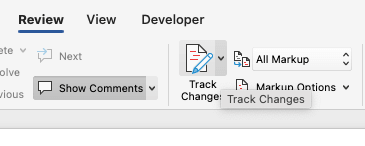
As a legal document moves between parties, a contributor from the opposing counsel might delete a subsection. When that edit is accepted before its impact on structural stability is addressed, the numbering in the TOC can shift, at which point the entire table may need to be regenerated.
Tip: Track Changes is a convenient collaboration tool, but it can modify the TOC structure underlying visible markups. Legal professionals should always account for structural impact before accepting edits.
Preventing TOC instability during legal collaboration
Prevention beats the constant cycle of diagnosing and fixing table of contents errors. And when it comes to legal collaboration, a few proactive habits go a long way.
Here are some best practices for preserving structure during drafting and negotiation:
- Verify structure is correct before sharing the document for edits.
- Use only current, firm-approved templates to establish consistency.
- Ensure any edits and inserted content are normalized against structure immediately.
Taking a proactive approach to TOC stability during negotiation can dramatically reduce cleanup before filing.
Master Microsoft Word for Legal Drafting
This is just one piece of the puzzle. Explore the Master Microsoft Word for legal drafting hub for all our Word resources for legal professionals.
MS Word Hub
What a table of contents actually depends on in a legal Word document
Tables of contents in legal Word documents derive their stability from the accuracy and consistency of the document’s underlying structure, not from constant manual formatting updates.
Legal document structure is often complex, meaning the TOC pulls from and configures itself around many different components. A disruption to any one of these components can throw off the entire structure. Common examples include:
- Appellate briefs that rely on a Heading 1 / Heading 2 hierarchy. If that hierarchy breaks down, so does the TOC.
- Contracts with article-level structure, where numbering inconsistencies can cascade through the document.
- Legal motions with multiple numbered sections, where errors in multilevel list definitions can destabilize the TOC entirely.
Tip: Think of a table of contents as a mirror: It reflects your document’s structure exactly as it is. That means heading hierarchies, section breaks, page numbers, and conditional field codes all play a role in what the TOC shows. If any part of that underlying structure is off, the TOC will be too.
Ultimately, a table of contents is only as reliable as the document structure behind it. Keep that structure clean and consistent, and your TOC will take care of itself.
Why the table of contents shapes how judges read your brief
Before a judge reads a single argument, they scan the table of contents. It’s their roadmap to your case, and your first shot at making a strong impression.
Here’s why it matters:
- It signals credibility. A clean structure and logical headings show the court you’re organized and prepared. Broken formatting or inconsistent numbering does the opposite.
- It communicates your argument at a glance. A well-structured TOC lets a judge immediately assess the logic and strength of your legal reasoning—before reading a word of the brief itself.
The bottom line: your legal document’s table of contents isn’t an administrative formality. It’s instrumental in framing argument structure and shaping the court’s initial impressions around the merits of your case.
When manual TOC management stops scaling in law firms
As law firms grow, managing tables of contents manually in Word becomes increasingly difficult to sustain at scale. Errors, formatting inconsistencies, and broken TOC structure tend to multiply as more contributors, edits, and document versions enter the picture.
Importantly, while lawyers and their legal team can learn how to diagnose and fix table of contents issues manually, there’s no getting around the fact that most structural failures are the product of Word’s limited and often fragile functionality. At some point, scaling drafting processes effectively becomes less about constantly fixing Word errors and more about implementing consistent and reusable legal templates and structure across documents.
Law firms should consider integrating advanced legal document automation and structured drafting systems. This is where legal document automation tools prove their value.
Tools such as Clio Draft automatically enforce key factors like heading hierarchy and pagination logic throughout editing cycles by auto-populating templates with relevant matter information. Built-in AI helps you create templates from your existing documents. That means less structural cleanup to work through when you do update your TOC before filing.
Overall, while it can initially be sufficient for simple matters, Word’s functional limitations often cause tables of contents to break as document complexity increases, requiring more time and manual effort to maintain stability than most growing firms can afford.
Looking to eliminate tedious TOC fixes while improving drafting accuracy, consistency, and structural integrity across legal documents? Book a demo with Clio Draft today.
Tables of contents in legal documents FAQs
Why is my table of contents not showing certain headings in my brief?
Headings may be missing from a brief’s table of contents if they use the wrong level or an unrecognized heading style.
Why do page numbers change after I update my TOC?
Page numbers often shift when recent edits inadvertently alter formatting or heading structure.
Should I update my TOC before or after accepting tracked changes?
The TOC should be updated after accepting track changes to account for any alterations in document structure.
Why does my TOC break after copying text from another document?
Inserting copied text can break the table of contents when the pasted text carries over hidden formatting changes from its source document.
How do I fix Roman numeral page numbers in my table of contents?
Roman numeral page numbers can be fixed by ensuring section breaks have properly separated TOC front matter from the main content.
Is it safer to rebuild the TOC or fix individual headings?
Fixing individual headings is safer than rebuilding if the TOC corruption is limited to a recognizable issue with the heading structure.
When should I restart from a clean template instead of repairing the TOC?
To decide whether to repair or rebuild a TOC from scratch, evaluate the level of structural corruption to determine if the risks of amplifying errors outweigh the effort required to restart from a clean template.
Master Microsoft Word for Legal Drafting
This is just one piece of the puzzle. Explore the Master Microsoft Word for legal drafting hub for all our Word resources for legal professionals.
MS Word Hub